Showing posts with label Windows. Show all posts

Wednesday, July 30, 2025

Windows Apps London (formerly Windows Phone User Group) - it was good while it lasted

TLDR: User groups were great. I miss organising and going to them. Maybe I should revisit my plans about this...

Average Rating 4.8 (from 275 reviews)

I've organized over 100 user group events / meetups. I've also attended and spoken at many others.

The one I had the most to do with was the Windows Phone User Group, which later evolved/became Windows Apps London.

I "ran" this for as long as it existed. It all seems a very long time ago, but as I finish shutting up the virtual shop on the group (Stop paying for things--like domains--that I really don't need and no one looks at) I wanted to take a moment to reflect.

Here are a few of many pieces of similar feedback.


“Great to hear dev thoughts & experiences & see some interesting apps demo’ed”

“Met lots of cool people, and was well worth the trip.”

“Great bunch of people. Lots of enthusiasm and the usual witty banter”

“Meeting was great – fantastic bunch of WP7 developers, designers and officianados!”

“I really enjoyed everyone’s demos; even the games, which is not my domain, provided some interesting info about phone dev.”

“Thanks very much for putting on the event. I found it really useful as well as wonderfully motivating.”

“A great opportunity to meet and socialise with other developers.”

“We had a great time, really informative stuff, we learnt several things both from the talks and from general networking that we’re going to apply to our current and forthcoming projects.”

“Really appreciate the effort put into the event, great to meet everyone”

“It was great being able to network with intellectual individuals”

“It was really awesome. I now have the knowledge to create a better app.”

“It was very informative and enjoyable”

Fantastic group. Always learn new things and pick up information

I like the format where someone knowledgeable us something we didn’t know already

One of the most interesting meetings I’ve been to

Wealth of knowledge to gain, recommended this to all developers

Good format, very useful.

Great event! Enjoyed the learning and the interaction with the other participants.

Thoroughly enjoyed the evening. Learnt a lot and looking forward to the next one.

Lots of fun, excellent talk and great people

I think this is a great event necessary for the platform. The atmosphere was good and enabling for sharing ideas.

Entertaining and inspiring talk

Really enjoyed the format! Great to hear everyone’s thoughts.

My mind is pretty blown away right now, very interesting evening with so much to takeaway and think about

Probably one of the best groups. Each meeting is useful for learning new things and getting a different point of view

Would love to see some more of these events

Fantastic presentation. Really helpful to pick up new tips.

Interesting conversation was flowing freely around the table. A really good night.

Great food, company, conversation and laughs!


I couldn't let all the history of something that was a big part of my life for a very long time go away completely, so I've created an archive of the website at https://mrlacey.github.io/winappsldn/
Not that I really expect this to be of much interest or use to anyone any more, but it felt too important (to me) to let it go away completely.


Friday, July 25, 2025

How quickly can a Windows application launch?

Following on from my recent post asking How much does start-up time matter when choosing a framework? I've now published some figures and the code I used.

With some minor tweaks, I now have an updated graph of the data:


This graph is based on the release builds of the simplest, most minimal apps I could reasonably come up with that were as close to identical in all frameworks.

The code and more details can be found at https://github.com/mrlacey/WinAppLaunchCompare

From that repo:

Miscellaneous observations:

  • As expected, WinForms was super fast.
  • WPF (both .NET and Framework versions) was surprisingly (disappointingly) slow.
  • The difference between MAUI and WinUI is surprising given MAUI uses WinUI to create the Windows version of apps. I expected these to be closer.
  • Of the cross-platform options (and WinUI) the difference is basically irrelevant. Having clicked the button to launch the apps many, many times, I didn't perceive any real difference, never feeling that one was slow or faster than the others.

My takeaways:

  • For choosing a cross-platform framework, there's hardly anything in it in terms of the time it takes to launch the apps.
  • I wouldn't base a decision to use a particular framework based on these (or similar) tests/results.
  • I also looked at the time until the App class was loaded. This varied but didn't seem to be related to the overall time taken.
  • Performing tests like these can easily become an infinite rabbit hole. There are always potential tweaks and optimizations that could be done. If you have such an interest, please go ahead.


Feel free to experiment with this code as you wish and suggest any ways it could be improved or anything artificially slowing down a version of an app can be addressed.


Friday, April 11, 2025

Choosing a framework to build a native app on Windows with .NET

"Thinking face" surrounded by logos of different frameworks

By "Native," I mean not using web technologies, either as a remotely hosted website or bundled into a package that is installed and runs locally.

Let's get this out of the way first. 

There is no "best". 

There is only best for your current circumstances and requirements at the current time.


That said, how do you decide what might be best for your circumstance?

Each option has slightly different capabilities. It's essential that you know what capabilities you'll need before you start building. If you don't know what you need to build, it's impossible to say which is best for you. This may make the decision for you. 
Doing the work in advance to fully understand the requirements can save a lot of frustration and wasted time and effort if you discover you need something the framework can't do. 

So, second disclaimer out of the way, how do you decide which .NET framework to evaluate first? 

If the first thing you evaluate does all you need, it's probably fine to go with that. If not, try another.


Q1. Do you think you might ever need to run on more than just Windows?

If Yes - go to Q2.

If No, go to Q4.


Q2. Do you want the software to also run on the web?

If Yes - Evaluate UNO Platform first.

If No - go to Q3.


Q3. Are you primarily interested in building an app that runs on desktop, or on mobile devices?

If Desktop - Evaluate Avalonia first.

If Mobile - Evaluate .NET MAUI first.


Q4. Do you already have any existing apps built with WinForms, WPF, UWP, or WinUI?

If Yes - continue using that. (Unless it's UWP, then go to Q7.)

If No - go to Q5


Q5. Are you building a "traditional line-of-business" app or something that could be described as "forms over data"?

If Yes - go to Q6.

If No - go to Q7.


Q6. Are you happy to use/learn XAML?

If Yes - evaluate WPF first.

In No - evaluate WinForms first.


Q7. Do you need to support XBox devices, game pad controls, or ink-based input?

If Yes - evaluate UWP first.

If No - evaluate WinUI first.


Happy evaluating!


Yes:

  • The above is probably an oversimplification.
  • There may be many situations where you don't go with the first suggested option above.
  • It doesn't consider personal preference. But if you already have a preference, you should probably use that. (Assuming it can do all you need).
  • I haven't considered support for different programming languages. (But you're almost certainly using C#).


This isn't intended to be a definitive guide. Without knowing your exact requirements, existing skills, and preferences, I can't say for sure. 

I just wanted to share some simple questions that others have found helpful when overwhelmed by the options available.


Also: Joe made the above into a flow chart.


Wednesday, April 02, 2025

Never create an IValueConverter again?

tl;dr: If using WPF or MAUI you can easily create a MarkupExtension to allow the use of static methods with a Binding, instead of using an IValueConverter. If using UWP or WinUI, you can do this with `x:Bind`.


An `IValue Converter` is a way to modify a value that is provided via a binding. I rarely use them, but others use them frequently and find the experience to be less than ideal.

I stopped using them a long time ago (while still using Silverlight) because they had a significant and noticeable performance impact. The performance impact today isn't as noticeable, but I haven't gone back.

By not using them, I also realised that they make the code easier to test. The logic I was performing in the converter (the way the docs and conventions of the time encouraged) actually made more sense in the ViewModel. When the logic is all in the ViewModel I only have to test that. I don't need to have tests that run the app and manipulate the UI to verify the internal logic.  (Yes, I test my MVVM code, and still have separate tests for UI verification--but not the internal application logic.)

That's me, but there are people who do create ValueConverters and don't feel happy about it.

There are two complaints that I hear frequently:

  1. The syntax is verbose.
  2. The need to create and initialize extra types seems unnecessary when all that is really needed is a static function.
This isn't such an issue for anyone using WinUI as that includes the `x:Bind` MarkupExtension which already supports the ability to call static functions as part of a binding.

So, if you had this class:

public static class Converter
{
    public static string MakeUpperCase(string input)
    {
        return input.ToUpper();
    }
    
    // .. other functions
}


You could apply the function as part of the binding like this:

<TextBlock
    Text="{x:Bind utils:Converter.MakeUpperCase(VM.Message)}" />


Yes, I'm using a trivial example throughout so as not to get caught up in the complexities of what the conversion function does and can instead focus on how it is used.


That's all well and good for WinUI code, but what if you're using .NET MAUI or WPF, where there is no x:Bind support?


Well, if what you want is the ability to provide a static function as part of a binding, why not create a MarkupExtension that does that? The X in XAML serves as a reminder of using something intended to be eXtended. Plus, this is software. If using a framework that doesn't provide the desired functionality, unless there's something preventing it, you can add it yourself.


So, why not create a MarkupExtension that behaves like a binding but also accepts a static function and automatically applies that to the value that is used?
It seems so obvious that I can't imagine why everyone isn't already doing this.

In this example, I've called by MarkupExtension "BossBinding" and it can be used like this:

<Label Text="{rx:BossBinding Message,
             Converter={x:Static utils:Converter.MakeUpperCase}}"
     />

This is from a .NET MAUI app. 
In all other ways, the BossBinding works and can be used like a regular Binding, but the Converter property takes a static function. 

To make it as flexible as a ValueConverter, it requires a slightly more complex signature, but the contents of the function is what would go in the `Convert` function of a class that implements `IValueConverter` so it doesn't feel that complicated.

public static class Converter
{
    public static Func<object, object> MakeUpperCase => (input) =>
    {
        if (input is string str)
        {
            return str.ToUpper();
        }
        return input;
    };

    // other functions
}


If wanting to be stricter about the types used in the conversion, a version of the static function and the property of the MarkupExtension could use types other than `object`.

To make this work for both .NET MAUI and WPF, it was necessary to have different implementations of the `ProvideValue` function. This was due to the differences between the two frameworks and the way they support bindings internally.

The XAML still ends up being the same.
For example, here's a snippet from a WPF app that does a similar thing to the above, but also uses a static method that accepts a parameter to set the text color based on the bound value.

<TextBlock 
    Text="{rx:BossBinding Path=Message,
             Converter={x:Static utils:Converter.MakeUpperCase}}"
    Foreground="{rx:BossBinding Path=Message,
       ConverterWithParameter={x:Static utils:Converter.ChangeColor},
       ConverterParameter=True}"
    />


The conversion function here is again very generic, matching what is done with an IValueConverter.
The code is also somewhat arbitrary and was created primarily as a quick way to demonstrate that this can work with parameters and return types other than strings.

public static Func<object, object, object> ChangeColor =>
(input, parameter) =>
{
     if (input is string str
         && parameter is string parameterAsString)
    {
        if (bool.TryParse(parameterAsString,
                 out bool parameterAsBool)
             && parameterAsBool)
        {
            switch (str.Length % 3)
            {
                case 0: return Colors.Blue;
                case 1: return Colors.Red;
                case 2: return Colors.Green;
            }
        }
    }

    return Colors.Black;
};


That solves the second problem mentioned at the start, but what about the first (syntax verbosity)?
Maybe that's something ENAMEL can help with..


Am I going to use something like I've shown above regularly in future? 
Maybe. I rarely use ValueConverters, so probably not.
It solves the problem of needing to create and instantiate custom types when all that's needed is a static function, but I still think it requires too much text in the XAML file.
Still, it's an option for anyone who prefers it. We don't all have to write code the same way, and there may be good reasons to sometimes need this.

If and when I do need to use a value converter, I prefer the automatic generation of MarkupExtensions based on the class implementing IValueConverter. I find it makes the required XAML much shorter and clearer. 

It means that instead of having to write this in the XAML file:

<Label Text="{Binding Message,
             Converter={StaticResource MakeUpperCaseConverter}}" />

I can write this:

<Label Text="{conv:MakeUpperCase Message}" />


But that's probably another post for another day.


I appreciate being reminded that there are simple ways to create something that solves a problem when you don't like what comes out of the box.


What I really reject is the idea that someone should complain about a limitation of a framework (which can never do everything that everyone might want or need) when there are simple solutions that any developer should be able to write themselves. I'm almost surprised that this is a situation where developers don't want to write code to solve a problem they're facing. Writing more code as the first solution is frequently something that developers need to be stopped from doing.


Wednesday, March 09, 2022

What's wrong with this WinUI code?

Here's some simple code.

There are probably many ways you can see that it could be different, but there's one major potential problem with this code. Can you see what it is?


private async Task OpenInBrowserAsync(Uri uri)
{
    await Windows.System.Launcher.LaunchUriAsync(uri);
}


The problem with this code is that it contains an unprotected "seam" between the code that's part of this codebase/application and code that isn't.


I'm going to use "your code" to mean the code that's written by you and "other code" for everything else.

Anywhere there's a place where your code meets other code, it creates a seam. A seam is where there's a potential weakness. When two things are connected or joined together, there's a potential for problems. It's where defects or issues are most likely to surface.


Let's go back to the code above. When LaunchUriAsync() is called, three things could happen.

  1. The URI could be opened in the default browser. This is what is expected and will hopefully occur most of the time.
  2. There could be an exception thrown by the other code.
  3. Something could happen that means the provided URI can't be opened, but no exception is thrown.

(Yes, other possibilities exist but won't be covered here.)


Scenario 1 is the easiest to think about. Everything works as expected, so we don't need to discuss this further.

Scenario 2 is vital to consider as it's likely to have a significant negative impact on the people using your app. Hopefully, it'll never happen, but it's always a possibility. You don't want other code to cause your app to crash. The people using it will still blame you. That an exception has its source in other code doesn't matter. That any potential exception is also coming from async code has the potential to increase the possibility that the exception could crash the whole app. Handling the potential for other code to throw an exception is essential!

Scenario 3 is easy to overlook. That code "works" or throws an exception is easy to appreciate. That there's a middle ground--where it "works" but not as expected--can be harder to appreciate and allow for. However, it's equally important for the people using the app that you allow for this as it is to handle exceptions.
If someone uses an app and when they do something, it causes the app to unexpectedly crash, it's easy to know something is wrong. But what happens when the person does something (click a button, select an option, whatever..) and nothing happens? The thing they wanted or expected doesn't happen, but neither does anything else? Do they try and do the action again? Could that have separate, adverse side effects? Is it being slow? Or slower than usual/previously? Did they do something wrong? Is the app broken?
Creating uncertainty in the minds of the people using your app is not something you want to do. It does not lead to happy users. Unhappy users lead to less usage, fewer sales, fewer recommendations, bad reviews. Nothing good.

As per the documentation, the method returns a boolean value to indicate if the URI could be launched.
Ignoring responses is not always wise and is certainly not a "best practice."

In programming, it's usually good to call a method and trust it will do the thing that's asked of it. However, a function that returns an indication of whether it could do the thing that was asked of it is not to be ignored.
Imagine asking someone if they can do something for you but sticking your fingers in your ears when they say if they can do it or not. You could assume that they can and will do it for you. But, if they say they can't, and you carry on assuming they can (and will), whose fault is it when it doesn't get done?

Do you like ambiguous code? Do you like using software where you can't be sure if it's working as expected? Do the people using your app like software that works like this? If not, don't give it to them.


Connected with the above is the issue of testability.

As the above is a small snippet of a larger codebase, it's not clear how (or if) it is tested. But we can assume it probably isn't.

It might be appropriate to abstract the interaction with the other code to make it possible to easily (and automatically?) test different actions and responses. Such tests can be more important than tests related to your own code, as it's often harder (or impossible) to forcibly get every possible response from other code so it can be tested.


So, what should the above method actually look like?

Well, here I might disappoint you. There is no single "best practice" way to write a version of the above method.

Instead, a "leading practice" would be to handle the response from the method, acknowledge that an exception is possible, and make it possible to test for such scenarios.
Maybe I'll show you an example of such code in the future. Let me know if you want to see it.


The above doesn't only apply to code that is part of the WinUI API.

This applies to any code that you didn't write. It might be an API from the platform, or it could be any library you're using. Any "seam" between code you write and code you didn't needs to be protected.


This doesn't (hopefully-obviously) only apply to WinUI related code, but I found a variation of the above amongst code that was supposed to be an example of "best practices." In lots of ways, it's definitely not a good example but I called this out in relation to WinUI as developers building with it deserve the best help I can give.


Friday, January 28, 2022

Windows Template Studio - reborn!

It was only a few weeks ago that I publicly announced that I'd given up on Microsoft taking the Windows Template Studio forward and so I was going to do it myself.

Now, things are changing again.

  • The official Microsoft project has been reborn as just Template Studio. (Yes, that's the name I was going to use too.)
  • I'll be bringing the work I've done on my own back to Microsoft's repository and the Windows-related apps that can be generated with it will all come from Microsoft.
  • I'll continue contributing as a "community member".
  • The extensions I've already released as previews (for UWP, & WPF) will stay as previews and be removed once official Microsoft equivalent versions become available.
  • I'm reserving the right to build my own extensions that can be used for things other than Windows apps.
  • There's more on the official roadmap.

As expected, the most common question right now is about the timeline.

The answer is that it's likely to take a few more weeks.

This is because:

  • I can't take my work "as is" and copy it all over. There are things I can't, don't want to, and shouldn't share from my code.
  • What's required in the official repo is different from my personal requirements.
  • There's functionality my version has removed that I need to find ways to reinstate for the official/public version.
  • There are still [regression] issues in my version (the previews) that I need to fix.


How can you help?

  • Try out the preview versions I've released. (There are some things that behave differently in the release builds and so need testing widely--which I can't do in testing.)
  • Raise any bugs or issues for things you find. (Are there things I've missed? If no one reports the things that I think are regressions, maybe they don't need fixing...)
  • Consider becoming a sponsor. You'll be credited in the previews and elsewhere, but I obviously can't include such images in the official Microsoft version. :(
Sponsor images shown in the wizard

Any other questions? You know where I am. ;) 

Tuesday, December 14, 2021

Forking Windows Template Studio

Windows Template Studio is a Visual Studio extension that helps developers scaffold Windows applications. 
I have a long, complicated relationship with the project and have been involved since its inception.

In June, Microsoft stopped funding the internal team who were working on it. I was told there were plans to continue the project with support from the community, but this didn't happen, and my emails have gone unanswered since then. 😢

Sadly, due to the way the project is set up and configured and because of the permissions I have, it's impossible to do anything significant within the existing repo.

So I'm taking it upon myself to do something separately.

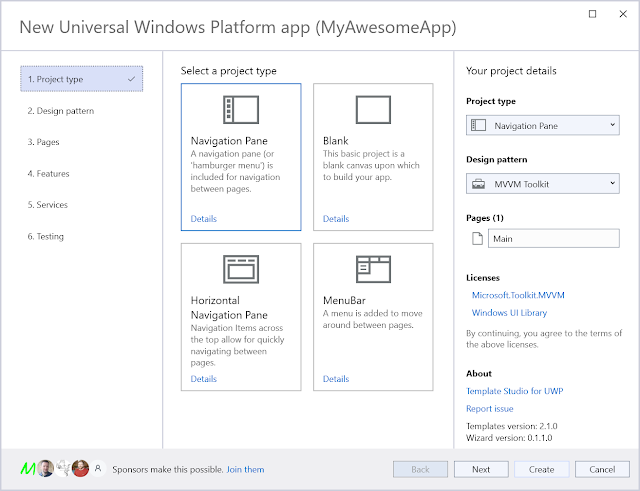
Announcing Template Studio for UWP. (preview for VS2022 available now!)

The wizard for 'Template Studio for UWP'
Yes, it looks very similar to the Windows Template Studio wizard.

I'm starting by taking the UWP (and then WPF) capabilities of WinTS and breaking them into separate extensions that work with Visual Studio 2022.

WinUI(3) support will hopefully follow. As will support for creating apps that don't only run on Windows.

There's lots of detail I'll spare you from, but the bits most likely to be of interest are:

- My goal is to help developers now. (When Microsoft has left them in a state of uncertainty.)
- I'm updating the dependencies in the generated apps and will add other improvements and new functionality.
- I want to reduce the dependencies on developers installing the extension(s). You shouldn't need the capability to build any/every type of Windows app just to use the extension.
- I'm starting by focusing on the parts of WinTS that are less likely to be supported by Microsoft (UWP & WPF) if they do resume development (& support) of WinTS.
I'm open to contributing to the WinTS project again, but I'm not just sitting around while I wait.
- I'm doing this in a way that gives me the best opportunity to do other things with the code in the future. (Look at me being all mysterious. 😉)
- I'm taking the opportunity to make some much-needed (in my opinion) updates to the project and its internal dependencies. 
- It's not open source (yet), but I'm not ruling it out for the future. (I have many reasons that I'll save for another day/time/place.)


It's in preview now & I'd love feedback.

The "Template Studio for UWP" entry in the "Create a new project" wizard


Sunday, July 04, 2021

What should you do with your UWP app?

Screenshot from the community call including the comment: "We have no plans right now to release WinUI 3 for UWP in a stable way."

Originally, the expectation was that WinUI3  would have support for both "Desktop" and "UWP" app models.

The focus was initially on Desktop with the promise that UWP would follow. Now, it's looking more and more likely that UWP might never be fully supported by WinUI3.

I can see this as a realistic scenario. The intention might be that one-day UWP support is added but it looks like it's very low priority and there are a lot of other things in front of it.

So, what if you have a UWP app?

If your app is only used on a desktop/PC then consider converting it to WinUI. Probably wait for WinAppSDK v1.0 and check that everything you need is possible in WinUI3 but that's your future.

If your UWP app is for use on desktop/PC and Xbox then you'll need to stick with UWP while we wait on future announcements.

If you're still hoping for a return of Windows Phone, then I can't help you.


Or, you could just keep it as it is. It should be good for a few more years at least.


Thursday, June 24, 2021

A cynical take on today's Windows announcement

A cynical response is all I can manage today.

Plus, my cynical view of past events has been appreciated by some and found entertaining to others.

Let me give you the highlights and answer some questions...

---


Do you remember how Windows 10 was going to be the last version of Windows?

....

Introducing Windows 11


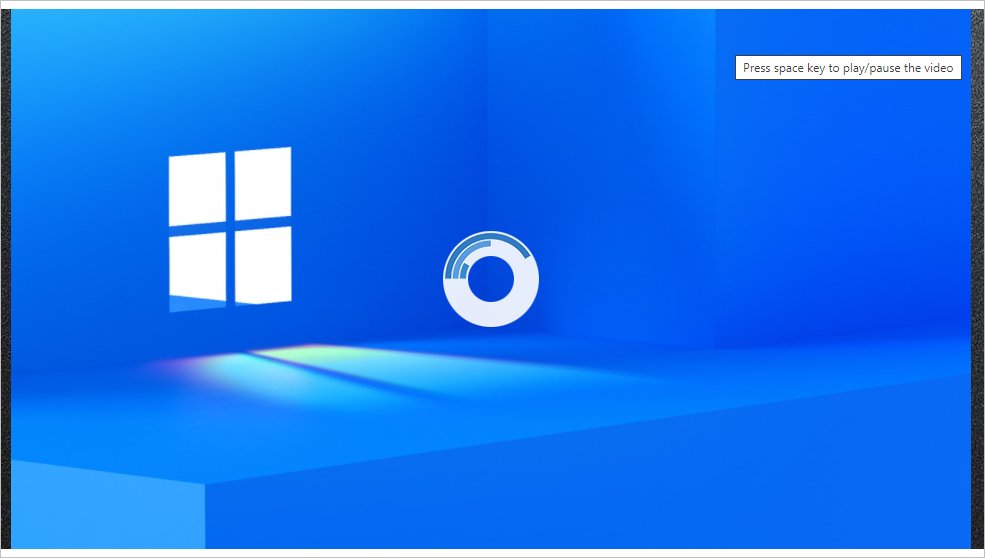
Eventually. It seems that in an online event about the future of Windows, they're using streaming tech from ten years ago.

Windows logo with buffering icon overlaid
(and also, this)


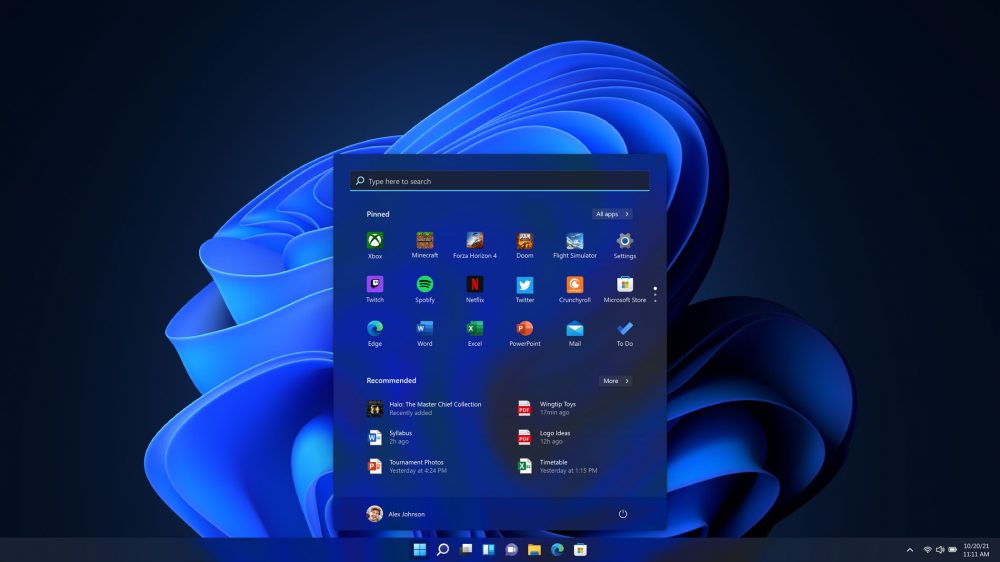
Do you remember how Windows 8 changed the start menu and how people complained and then, in response, Microsoft put it back where and how it was?

It's moved.

And looks different.


Anyone taking bets on how long before there's an app in the store that mimics the old start menu?


--- 


"Hey Matt, as you're a Windows Development MVP. What can you tell us about developing for Windows 11?"

Only what was in the announcement. I had no advanced knowledge of today's announcements. I only knew it was coming from the "leaks" on Twitter. There is also an official blog post announcement for developers.


"There seems to be a lack of major changes. It looks a lot like an update to Windows 10 but with an extensive UI refresh."

- Yes, it does. Doesn't it. Hopefully, we'll see the bigger differences in time.


"There seems to be a big focus on PC gaming."

- Yes, there does. People use PCs for gaming. A lot!


"Is this why there haven't been any big updates for Windows in the last few years?"

- Probably. Of course, it's complicated, and there can't be big changes every few months, but this could be connected by the fact I can't remember any noteworthy updates for Windows 10 within the last 2 years.


"There was a lot of focus in an updated UI. Will all apps from Microsoft be updated and look like this?"

- You can probably expect most of Office to look like this and many of the apps that come with Windows to be updated, but there will be some that aren't updated and will keep the look they've had for years (forever!)
From a development perspective, I'm curious what happens with the controls in WPF & WinForms apps.


"Will everything go (back?) to having rounded corners?"

- The trend for rounded and square corners alternates. Don't worry if you're not a fan. It'll change again in a few years.


"A lot was made of the 'sheet of glass' look in the video. This looks like what was called 'Acrylic' previously. Is it the same thing?"

- Very similar. There's more about Mica in the docs.
Again, with my developer hat on, I'm aware of issues relating to using and implementing Acrylic for WinUI3. So let's see where, when, and how this is available to developers...


"I'm curious about how the new design is meant to help 'bring a sense to calm.' What about all the slow, buggy apps and poor UX experiences that frustrate me? Are these getting fixed as well? Or is the new design merely a distraction from poor UX?"

- Let's hope that work is being done to help with the poor UX of many apps. I don't think an OS update will magically fix anything in this area, though. BTW. If you're interested in improving the UX of your app, I wrote a book that can help you.


"Some of the new features look like updated versions of things that were already available in PowerToys. What's up with that?"

- One of the goals of Power Toys is to try things out that may eventually end up "in the box." This is an example of the learning from Power Toys making it into the OS. It's not the same, and I don't expect to give up using Fancy Zones even when using Windows 11.


"A lot of the announced productivity features are things that we've been asking for for years or are things that already exist (such as vertical tabs in Edge) are they worth making a big deal about?"

- Time will tell when we've had a chance to use them for a while. Hopefully, lots of little improvements will lead to a big overall improvement.


"If Teams is integrated into Windows, does this mean they've fixed all those annoying inconsistencies, bugs, and issues with switching between tenants?"

- Let's hope so....


"Windows widgets seem a lot like updated versions of live tiles from Windows Phone and Windows 8?"

- That's definitely a reasonable comparison.


"The page for getting more information (https://www.microsoft.com/en-us/windows/windows-11) includes a tool that can be downloaded to check for device compatibility, but it's packaged as an MSI, rather than an MSIX. I thought MSIX was the recommended format for installing apps. Why isn't this being used? Is MSIX supported for Windows 11?"

- Expect MSIX to continue to work on Windows 11. MSI still works. I assume that it wasn't used here to enable support on devices running ancient versions of Windows that don't support MSIX. 


"What can you say about the game pass?"

- Nothing. Games aren't really my thing. (I might be getting old and boring...)


"What's with the new store? This seems to get a refresh every few years, but people don't like using it, and it seems to regularly give unhelpful error messages."
- The store has been rewritten, and hopefully, this will address many of the issues. More here


"Android apps running on Windows!!! What's that about? Wasn't it tried before?"

- Yes, this was tried before. Hopefully, the new "Intel Bridge" will work better than past efforts, as it emulates ARM instructions on Intel processors. Expect there to be limits on what those apps can do when running on Windows, though. Not that there will be things that don't work (there may be a few edge cases) but don't expect them to use all the native features of Windows when they were built for Android.
This is based on the "Windows Subsystem for Android." (Yes, similar to and related to the Windows Subsystem for Linux)


"What else is coming for Windows app developers?"

- A few things:

  1. With the new store, you can use whatever you want to handle commerce, and Microsoft won't take a cut if you use a separate payment solution.
  2. An update to PWABuilder.
  3. A reinforcement of the intention that you should consider WinUI3 as the framework of choice for building native Windows apps.


"Any updates related to WinUI3?"

- Not really. Version 0.8 is now officially released. But most of the work that has been done since the last release (v0.5) has been experimental work in preparation for the 1.0 release.


"What's the 'Windows Apps SDK'?"

- That's the official name for what was previously known as "Project Reunion." 
(Yes, it's a long wait for an uninspiring name. I wonder what else was considered and rejected...)


"Apparently, 'Windows is more Open' now, does that mean Open Source?"

- Nope, I don't expect Windows to ever be fully open source, but some technologies and parts of it are, and more are expected in the future.


All this is very new. I make no guarantees about the above and expect to share more information in the future.


Friday, January 24, 2020

Feb 25th is UnoPlatform day (in London & Birmingham)

Are you in London or Birmingham (in the UK)?
Want to learn more about the Uno platform?

Uno logo

You're in luck, as I'm giving introductory talks:

In London, on the morning of Feb 25, at 9AM

In Birmingham, on the evening of Feb 25, at 6PM


More details and registration can be found by following the above links.

If you're in (or near) London but can't attend at this time (maybe you have work or something like that) stay tuned for details of an evening event coming soon...


Thursday, February 25, 2016

Xamarin joins Microsoft - initial reaction

Because I know a little about these things and sometimes people like to know what I think, here are my initial thoughts about the announcement that Microsoft intends to buy Xamarin.*


* I have been asked to only say positive things about this announcement. As I don't work for either company and my value and experience comes from being an impartial outsider. I am ignoring this request and instead providing my honest thoughts, whether they turn out to be positive or not. This will likely be a stream of consciousness type list that I haven't planned in advance. Full disclosure: I use and pay for products from both companies. I also get some products free from both companies as a Microsoft MVP.

Details are scarce at the moment and I know nothing that isn't public.
In no particular order, here's what I think right now:


  • Lots of people have been asking/hoping for this. Perhaps it'll make them happy. (They're developers though so probably not for very long though)
  • Many developers were asking for this because they assumed that it will mean the tools become free (like other Microsoft tools). It might be nice if Microsoft's deep pockets make this possible.  We all suffer if people can't create great software because they don't have access to tools. On the downside it'll mean more developers churning out pointless/poor/low quality apps just because they now have access to the tools.
  • Hopefully Xamarin University will remain unaffected. I'd be sad to see this go, but this isn't something that could easily be scaled up (without greatly affecting qualilty) if Microsoft just made it free to all.
  • This will still not create the panacea, universal WORE app experience that many developers want Microsoft to be provide. Lots of developers seemingly want to be able to build a single package and run it on every device they can think of. (at least: Windows PC, Windows phones, Mac, iOS and Android phones and tablets.) There are two general approaches to such apps. 1. You build enough commonality into the OS of each platform/device to make this possible. or 2. You put a runtime onto each platform that makes the app work on each. Neither of which are possible on all those platforms to a way that is acceptable to most apps or developers. - Sorry, this is too big a subject to cover here. Ask me for more details if you want.
  • Hopefully this will improve the Windows experience for Xamarin.Forms apps.
  • Hopefully this will now incentivize Microsoft to make the changes/access required to get Windows devices in the Xamarin Test Cloud. This should mean improved automated testing capabilities for all!
  • Developers still shouldn't expect that this will get us any faster to a place where Xamarin.Forms apps have a greater level of per device customization and integration without the need for doing that customization yourself. There's only so much automagic detecting of how an app should be customized that's possible.
  • This still makes it incredibly unlikely that it will be possible to build iOS apps without having an actual Mac. The restriction is imposed by Apple and I don't expect a solution (workaround) like you get with PhoneGap build or NativeScript. Developers ask for this because of the cost of purchasing the hardware. They don't see it as an investment. This also ignores the situation that without Mac hardware it also makes it very slow to test running on iOS devices as there's no simulator or on device debugging available.
  • I expect Xamarin.Forms XAML and UWP XAML to continue to exist side-by-side. It might be nice if there was just one that did everything but there's precedent and good reason to have both. Plus, WPF XAML still exists and that has differences too.


It'll be business as usual for the next few months at least, but certainly interesting times for traditional Microsoft and Xamarin developers....


Saturday, March 28, 2015

Interpreting the statistics in the AdDuplex monthly report


Every month AdDuplex, the leading cross promotion network for Windows Phone and Windows Store apps, releases a report with statistics on devices running apps that have their advertising controls embedded. You'll find the latest one (for March 2015) on their blog at http://blog.adduplex.com/2015/03/adduplex-windows-phone-statistics.html

*disclaimer - if you didn't know, I'm a paid advocate for AdDuplex and help in preparing the report*

As happens every couple of months, there has been some discussion about the relevance and completeness of the data used to prepare the report.
I want to address some of these points and add some clarification over what the report actually shows.

Firstly, let's be clear on what the report is.
The report is an analysis of the devices used to show ads from the AdDuplex network on a particular day. It does not attempt or claim to be an analysis of all Windows Phone devices in use worldwide.

If it's not a complete picture, what's the point of the report?
The report serves three purposes:
1.  To provide information to developers who are or are considering using the network.  This was the ultimate aim when the report was first published. To help developers. After all helping developers to best promote their apps is one of the core aims behind AdDuplex.
2.  To raise the profile of the company. Because no one else is publishing such reports this is the best view of the device landscape available and so is newsworthy in appropriate circles.
3.  It’s better than nothing. Without this report, how would you know which devices are actually in use? At best you'd rely on anecdotal evidence or data collected from a smaller sample set.

It's the first point that is most important!
With this information developers can be aware of which devices are most likely to be used to run their app. It's really easy to assume that other people are like you and, just as much as anyone else, developers often fall into this trap.
In general, most developers I speak to who have and use a Windows Phone have a higher spec device. At the moment they're mostly the Lumia 930, 1020 or 1520. Based on this it would be easy for developers to only think about such devices and how their app looks, performs and behaves on such.
However, through looking at the data in the report it is clear that the majority of devices in use are not like these. 60.8% of devices in use are Lumia 5XX and Lumia 6XX devices. These devices have smaller, lower resolution screens and less powerful processors. Without paying attention to it, the experience of apps across different devices can change and be less than desirable in some instances. For this reason it is important to check apps on different devices. This is even more important when the majority of [potential] users are on such low spec devices.

But this still isn't representative of all devices!
There's an argument that people who pay more for a device are less likely to be tolerant of ads in their apps and so won't use them or will pay to remove them. The corollary of this being that people who pay less for their device have less disposable income and so are more likely to be tolerant of having ads displayed in their apps. This argument is based on anecdotal evidence at best as is also likely to be skewed by cultural biases as people in some parts of the world are more tolerant of ads and readily accept them.
Whether the opinion or anecdotal evidence reflects reality or not, this is a point that needs to be addressed.
AdDuplex are not able to answer this question, don't attempt to and for the sake of informing the people who are using their network it doesn't matter.
- Due to the way that the data is gathered, from apps that are displaying ads, it is not possible to report on devices running apps that don't show ads.
- The report is clear is saying it shows data based only on devices running apps that contain their ad control.
- If you're a developer looking to show adverts in your app then the devices of people who don't use apps that contain ads are not as relevant.

For those of you who are particularly interested, here’s an official comment from AdDuplex on this matter:
The accuracy of the stats we gather is obviously affected by a lot of factors. These range from differences in incomes in various countries to accessibility of mobile internet to the effect of bigger apps and games that we have and the audiences that they target. An argument that people with higher end phones are more likely to buy paid apps is probably correct on a logical level, but it doesn’t mean the opposite – people who are likely to buy paid apps are not less likely to use free apps too. People who are “allergic” to ads come in different shapes and forms of personal income and device preferences (not everyone who can afford an expensive phone necessarily buys one). On the other hand the argument could be made that more of the owners of cheaper phones don’t have access to mobile internet (or have a limited/expensive access) making them less likely to see the ads in apps. More people who buy cheaper smartphones necessarily use them as one (never download any apps at all). It is also worth noticing that not all of the apps and games run on 512mb memory devices, potentially skewing the stats in favor of more expensive devices. All-in-all you can have a number of arguments tilting the scales in favor of one theory or the other, but there’s no data to quantify these effects. At the end of the day with data coming from more than 5,000 apps of various types and calibers, I think the results even out quite nicely and, while no statistical report can be 100% accurate, I’m sure we paint a pretty credible picture of the ecosystem as a whole. And I’ve heard off the record confirmation of this from people who’ve seen the “real” numbers.

Wouldn't it be nice to have more?
Yes, from a point of curiosity there are lots of things that it would be useful to know about what devices are in use, where they're used and what apps are used on them.
There are also strategic and tactical decisions that could be better made with this data.

So why aren't reports with this data published?
The main reason is that the only people with the complete data are Microsoft and there are almost certainly competitive and legal reasons not to release all the data. They have released some in the past (the last was in September 2014 http://blogs.windows.com/buildingapps/2014/09/29/windows-and-windows-phone-store-trends-september-2014-update/) but there is a lot they haven't shared with us.

Could anyone else provide more information?
Possibly. It depends on what data you want though.
If you're just after an analysis of all types of devices in use you need analytics from a publisher (or publishers) who has a free app (or apps) used worldwide.
If you want to compare free, ad supported and paid apps then you need aggregated data of all such apps across all territories you're interested in.

There are probably only a handful of publishers who have sufficient data to provide this analysis.
Other advertising networks or analytics providers probably have the information to produce such reports.
Here's the catch though, there is no incentive or commercial interest for any of them to produce and share such a report so I don't expect any of them to do so any time soon. Should anyone do so, I be as keen to read it as anyone.


It may not be everything that everyone would like but the monthly AdDuplex report provides an insight into what devices are being used by the people who use ad supported apps.
It's also the best public information there is.

Monday, March 16, 2015

Slide view / splitview / side draw and a hamburger are not necessarily the same thing


There has been a lot of discussion about some of the native apps in the Windows 10 technical preview releases using a hidden menu, accessed via a "Hamburger icon". Some people have taken great offence to this and object to it's use in Windows Apps.
Let's get a few things clear though:

  • The hamburger icon is a variation on the icon for a list that represents a menu (a menu is just a list of options anyway)
  • It's typically used on a small screen device, where space is limited, to allow for the person using the software to cause the menu to be displayed. The menu is not typically shown all the time because of the amount of screen real estate it requires.
  • In addition to being useful on small screen devices, it's also useful when the size of the window can be changed and vary greatly.
  • The idea is to hide the menu off screen until it's needed.
  • The downside is that the person using the software doesn't know what's in the menu until they open it. If they don't use it regularly and/or it contains a long list of options then they have to remember what's there. Or, more likely, they have to open it to see what options they have.
  • How the menu is displayed is not related to using the "hamburger" icon to represent it.
  • You do not have to use a side draw or slideview to show a menu.
  • Using a side draw or slideview does not require the use of a hamburger icon. You could use something else. Even text.
  • It's a convention though. Many people already recognise the hamburger icon (even if they don't call it that) and have an expectation about what it will do.


You don't have to use a hamburger icon in your [Windows 10] app.


Tuesday, February 24, 2015

How developers should think about CPM, CPC and CPI with regards to advertising.

CPM - Cost Per Mille (1000 impressions)
CPC - Cost Per Click
CPI - Cost Per Install

These are the three main ways that in app advertising is bought and sold.
I find that developers are often confused about the differences so let me try and explain.

I'm thinking particularly about adverts for apps here. Specifically as part of a user acquisition strategy.

Let's start by looking at the "user acquisition funnel".


It's a simple concept.
Lots of people see the ad. Some of them click on the advert and then some of them install the app.

With this in mind there are three ways we can get more installs of an app.
1. Get more people to see the advert.
2. Get more people who see the advert to click on it.
3. Get more people who go to the store to install it.

These three ways of increasing installs relate to the three ways of paying for advertising. - Don't be surprised, this isn't a coincidence.


If I want people to see an advert I can pay (CPM) for the advert to be shown. I can pay more for the advert to be seen by more people. I can also, potentially, pay more for the adverts to be displayed to people who are more likely to click on it. In this scenario the person selling the advertising space just needs to provide the space to show the advert. How successful the app is in getting people to click on it is my responsibility as it will come down to how the advert looks and what it says.

If I pay just for the people who actually click on my adverts (CPC) I will expect to pay a bit more but there's a change in responsibility and the relationship between myself and the person selling the advert space. We now both have an interest in the advert being clicked on. For the ad seller the clicking on the advert is the end in itself. For me it's just a means to an end. We want different things from the advert. If I'm creating the advert and it's not as successful as it could be the ad seller is missing out on revenue. If they create the advert it will likely be optimised for getting people to click on it regardless of whether they have an ultimate interest in installing the app or not.

For many people, paying on a CPI basis is appealing as it removes the guesswork and responsibility from running adverts. You don't have to pay for adverts that no-one clicks on, or that are clicked on but don't lead to people installing the app. In this situation you're paying for results and not just things that should lead to the ultimate result you want. As with paying on a CPC there is a conflict in terms of who created the adverts. In that they are being paid for each install that is driven by an advert (the real value of the advert in a CPI scenario is as a way of tracking where the install came from) the incentive to produce the best advert should be on them. After all, the better the advert the more installs the app will get and the more money they'll earn. Of course, it's not just about the advert, how the app appears in the store will also affect if people install the app. Do you let them produce everything in the store listing too? What about all branding, icons and screenshots? Good screenshots that clearly show the value of the app and how good it is can help persuade people viewing the store listing to actually install the app. Taken to its extreme this may mean them wanting to redesign the app so that more people will install it. While this would be good for the app it's not something any ad company is offering. Yes, some will let you advertise on a CPI basis but it's not always the ideal situation it may seem.

All three ways of paying (or charging) for ads each work to serve the ultimate aim of getting more people to install, and hopefully use, an app. Just be aware what you're actually paying for and where the responsibility for success lies.

Advertising your app can be a challenging task but that isn't a reason not to do it though.


Wednesday, February 11, 2015

Create better ads for your apps

As an app developer you're probably not an expert in advertising (I'm not either), but over the last couple of weeks I've been running such an experiment with the creators of  a few apps in store to help us all, hopefully, learn a few things about what makes a good app advert.

Let me start by introducing the apps:
Digi Clock Plus Digi Clock Plus
Digi Clock Plus is all you need whilst at home or travelling to transform your phone into a functional digital alarm clock with fun added extras.
This is one of the most comprehensive clocks in the marketplace and delivers some of the top requested features - photo frame, weather, personalised alarm music and speech.

Grid Ref UTM Grid Ref UTM
Pinpoint your current map reference location anywhere in the world, using the Universal Transverse Mercator geographic coordinate system. (UTM)
App Provides: UTM Grid Ref, Hemisphere, and WGS84 Latitude and Longitude values.
The Accuracy of Readings, as indicated by your device, will also be shown.
Grid Ref UTM - Your Grid Refrence App!

MetroSpec MetroSpec
MetroSpec is a fully featured 16K/48K Sinclair ZX Spectrum emulator for Windows Phone.
Relive the 80's & early 90's by playing the classics, on the 8-bit micro that, kick started the home computer boom.
The ZX Spectrum was an 8-bit computer released in 1982, as the successor to the ZX81. Based around a Zilog Z80 CPU, 48Kb of RAM, 16Kb ROM, beeper sound, rubber keyboard, and tape loading, the ZX Spectrum was a true classic, and now you can relive the experience, bring back your old memories, or beat that final boss you found so hard before.

Night Chopper Night Chopper
Silly and weird little chopping game! Tap tap tap, and chop down that tree under the moonlight to nice piano sounds. The viewpoint is bottom-up, and you have 4 positions to chop from. Avoid those sharp branches!

Yaht 3D Yaht 3D
If you like Yahtzee then this game is for you!
Yaht 3D is based on the dice game called 'Yacht' which is the predecessor to Yahtzee.
Play this simple and fun game against your friends in hotseat mode or try to beat the phone.
Yaht 3D takes advantage of the performance of the Windows Phone to bring you accurately simulated dice rolls. See the 3D dice leap out of your phone, spinning, colliding and tumbling under the forces of gravity.

Each of the above apps are currently available in store and are part of the AdDuplex cross promotion network.

For the experiment we ran two versions of an advert for each app for a week to see how different wording would impact how successful the ad was in persuading people to click on it.

To keep things simple all ads were text ads.
If you're not familiar with how these work: "Text ads are automatically animated to show blocks of 2 lines at a time. Line 1 and 2 are displayed together on one panel of the ad and lines 3 and 4 on the second panel."

Here are the ads we used:

Digi Clock Plus
Option 1     Option 2
Digi Clock Plus
all you need whilst at home or travelling
transform your phone into a functional digital
alarm clock with fun added extras
   
Digi Clock Plus
Free app
transform your phone into a functional digital
alarm clock with fun added extras

Option 2 produced a CTP that was 13% higher.
The only difference between the two ads is the second line. Highlighting that the ad was for a free meant more people clicked on the app.


Grid Ref UTM
Option 1     Option 2
Grid Ref UTM gives you UTM Coordinates, Zone,
and Hemisphere information, on your Windows Phone
Know where you are with UTM / MGRS information
simply presented, on your Windows Phone handset
   
Never get lost again, thanks to your phone
lookup your current UTM location, zone..
..hemisphere, and latitude/longitude coordinates,
simply presented, on your Windows Phone handset.

Option 2 produced a CTP that was 6% higher.
There's not a lot in it but the more successful option is shorter and starts with a clear description of the value the app provides. "Never get lost again" is easier to understand than "gives you UTM Coordinates......" and makes it clearer what the app can do for the potential user.


MetroSpec
Option 1     Option 2
Love Retro gaming? Love 8-bit?
Relive the 80’s
MetroSpec
Sinclair ZX Spectrum Emulator
   
Remember the good old days?
Manic Miner, Sabrewulf, Highway Encounter
Play them again, and more, with MetroSpec
Sinclair ZX Spectrum Emulator

Option 1 produced a CTP that was 2% higher.
It's hard to draw a conclusion from this as while the two ads are different they were both equally effective. They didn't just produce the same level of results they were amongst the highest of all the ads listed here.


Night Chopper
Option 1     Option 2
Night Chopper
tap tap and chop down that tree!
Night Chopper
avoid those sharp branches!
   
Night Chopper - FREE and downloaded by 250.000!
Relaxing game with beautiful piano songs
Nigh Chopper - Rated 4.5 stars by 2.000!
Listen to anime, TV/movie themes++ while playing

Option 1 produced a CTP that was 15% higher.
This result actually surprised me. In adverts, at least, showing how many downloads the app has had, or the ratings it's been given didn't lead to more clicks.
The more successful advert was simpler and, I think, intriguing.


Yaht 3D
Option 1     Option 2
Yaht 3D
Like Yahtzee? Try this 3D dice game.
Yaht 3D brings ultra realistic dice physics
Download full game for FREE!
   
Yaht 3D
"A fascinating and beautiful game" - 5 stars
Tap here to download
"I am hooked. This game is so much fun :-)" - 5 stars

Option 1 produced a CTP that was 8% higher.
As with Night Chopper, highlighting the star ratings that other people have given it didn't lead to better results.
Also, as with Digi Clock Plus, highlighting that the app is free was a successful strategy.


Summary
So, to recap, what have we learnt from all this?
I think we can draw the following recommendations:

  • If you're advertising a free app make sure that you highlight this in the ad.
  • Having less text in an ad is better than having more text.
  • Have a clear value proposition. - Make it clear what will people get from your app.
  • Don't bother focusing on how good other people thought the app was by listing your reviews and number of downloads. Tell people what's in it for them.


Hopefully these tips will help you improve the copy in the ads for your apps.
I'd encourage you to test whatever text you use in your ads though.

If you're in the UK, already have an app in the AdDuplex cross promotion network and are interested in me running some ads for your apps on your behalf please get in touch. The only deal is that you agree to me sharing the results of the test like above.
What have you got to lose?


Monday, February 02, 2015

Thursday, January 29, 2015

What makes a better ad for your app?

Do you advertise your app? Have you integrated cross promotion of your app with AdDuplex?
How did you come up with the copy you use in your ad? Have you tried testing different versions of your ads to see which is more effective?

This is just what I've been doing with a number of developers recently. We've run two versions of an ad for one of each of their apps to see which is more effective and what we can learn from that.

I'll post the full results of the experiments soon but for now lets try a little test. Consider these two options.

Option 1
Option 2


Which option would you choose?
Which option do you think more people would click on?

Let me know what you think, in the comments or on twitter, and I'll tell you which did better soon.