Showing posts with label Template Studio. Show all posts

Wednesday, November 23, 2022

MAUI App Accelerator v1.1 - Now with C# Markup support

Version 1.1 of MAUI App Accelerator is now available from the Visual Studio Marketplace.
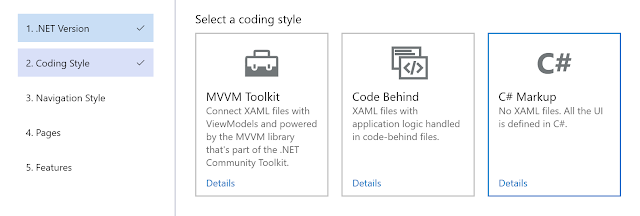
The big change in this version is the inclusion of C# Markup as a 'Coding Style'.

Partial wizard screenshot showing all three Coding Style options

This adds a way of creating the UI entirely in C# and with no XAML.
Ok, that should probably come with a small asterisk, as the generated apps still include XAML files which define the default control styles. I'm not sure if this is the best way to go. Looking at various public projects, it seems there is mixed opinion on doing this. If you have thoughts on what MAA should do, I have an issue open on GitHub where I'd love your feedback

Exploring the creation of UI without using XAML has been an enlightening experience. It's caused me to think in new ways about creating the UI. It's also tied in with some of the thinking I've been doing recently about how to improve the way XAML is written.

The overarching thing I've seen when exploring creating UIs this way is that it's a technique that's still in its infancy. There's a lack of established patterns and "best practices." Lots of what I thought of as basic, core functionality is missing. There's a lack of consistency and conventions is how people create UIs this way. Also, lots of what I've seen seems to be based on ways of recreating in C# what would otherwise have been done in XAML. This seems to be missing out on some of the potential benefits of not using XAML. When writing C# to create a UI, I find I want to do things very differently from how I would in XAML, but I don't yet know if that would have any currently unforeseen consequences or be too hard for others to understand.
The UI code generated by MAA is still very simple. It's this way, so it's easy to remove (for those needing something different in their app) and understand for those who are learning--or want to know what can/can't/should/shouldn't be removed. 
I strongly suspect that people creating UIs with C# in a couple of years will be doing it differently from how I see it being done today.

I'll continue to watch the MAUI.Markup and CSharpForMarkup repositories, and hope to learn from them as more people start creating UIs this way.

Friday, November 11, 2022

Template Studio for .NET MAUI

 Except it's not called that.


Introducing MAUI App Accelerator.


It's a Visual Studio extension that helps accelerate the creation of new .NET MAUI applications.

After installing the extension, when you create a new app and after specifying the name and location for the project/solution, a 5-step wizard is displayed that allows you to include the pages, features, and functionality that you want.

The goal is to make it simpler and faster to get started with the app you want. It does this by reducing the amount you have to delete from a newly created project and adding more things you want to add. It should save you lots of time when creating a new app and help provide a structure to the codebase that will help you on the path to success.

As a bonus, it also allows you to see different features, functionality, and ways of writing code

Wizard step 1 - pick the version of the .NET Framework to use

Wizard step 2 - Do you want to use MVVM or Code behind?

Wizard step 3 - What do you want the navigation system for the app to be?

Wizard Step 4 - What pages should be included in the app?

Wizard Step 5 - Any other features or functionality to add?

There are lots more features and options I want to add.

Some of these ideas are documented on GitHub. Please add issues with any ideas you have of things you think should be included.


My GitHub sponsors helped make this possible. You can see some of them (i.e. not the ones who made their sponsorship private) credited in the wizard. 

If this is helpful and you want to help support more development, please consider becoming a sponsor.


And as a bonus, I created this little goat icon for it. :)

Goat icon


Friday, January 28, 2022

Windows Template Studio - reborn!

It was only a few weeks ago that I publicly announced that I'd given up on Microsoft taking the Windows Template Studio forward and so I was going to do it myself.

Now, things are changing again.

  • The official Microsoft project has been reborn as just Template Studio. (Yes, that's the name I was going to use too.)
  • I'll be bringing the work I've done on my own back to Microsoft's repository and the Windows-related apps that can be generated with it will all come from Microsoft.
  • I'll continue contributing as a "community member".
  • The extensions I've already released as previews (for UWP, & WPF) will stay as previews and be removed once official Microsoft equivalent versions become available.
  • I'm reserving the right to build my own extensions that can be used for things other than Windows apps.
  • There's more on the official roadmap.

As expected, the most common question right now is about the timeline.

The answer is that it's likely to take a few more weeks.

This is because:

  • I can't take my work "as is" and copy it all over. There are things I can't, don't want to, and shouldn't share from my code.
  • What's required in the official repo is different from my personal requirements.
  • There's functionality my version has removed that I need to find ways to reinstate for the official/public version.
  • There are still [regression] issues in my version (the previews) that I need to fix.


How can you help?

  • Try out the preview versions I've released. (There are some things that behave differently in the release builds and so need testing widely--which I can't do in testing.)
  • Raise any bugs or issues for things you find. (Are there things I've missed? If no one reports the things that I think are regressions, maybe they don't need fixing...)
  • Consider becoming a sponsor. You'll be credited in the previews and elsewhere, but I obviously can't include such images in the official Microsoft version. :(
Sponsor images shown in the wizard

Any other questions? You know where I am. ;) 

Tuesday, December 14, 2021

Forking Windows Template Studio

Windows Template Studio is a Visual Studio extension that helps developers scaffold Windows applications. 
I have a long, complicated relationship with the project and have been involved since its inception.

In June, Microsoft stopped funding the internal team who were working on it. I was told there were plans to continue the project with support from the community, but this didn't happen, and my emails have gone unanswered since then. 😢

Sadly, due to the way the project is set up and configured and because of the permissions I have, it's impossible to do anything significant within the existing repo.

So I'm taking it upon myself to do something separately.

Announcing Template Studio for UWP. (preview for VS2022 available now!)

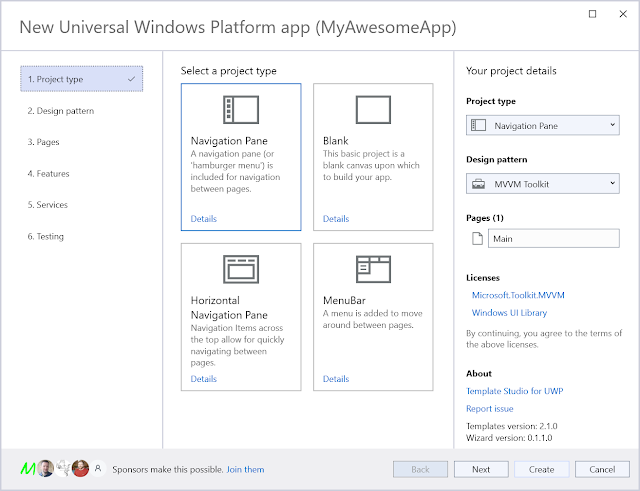
The wizard for 'Template Studio for UWP'
Yes, it looks very similar to the Windows Template Studio wizard.

I'm starting by taking the UWP (and then WPF) capabilities of WinTS and breaking them into separate extensions that work with Visual Studio 2022.

WinUI(3) support will hopefully follow. As will support for creating apps that don't only run on Windows.

There's lots of detail I'll spare you from, but the bits most likely to be of interest are:

- My goal is to help developers now. (When Microsoft has left them in a state of uncertainty.)
- I'm updating the dependencies in the generated apps and will add other improvements and new functionality.
- I want to reduce the dependencies on developers installing the extension(s). You shouldn't need the capability to build any/every type of Windows app just to use the extension.
- I'm starting by focusing on the parts of WinTS that are less likely to be supported by Microsoft (UWP & WPF) if they do resume development (& support) of WinTS.
I'm open to contributing to the WinTS project again, but I'm not just sitting around while I wait.
- I'm doing this in a way that gives me the best opportunity to do other things with the code in the future. (Look at me being all mysterious. 😉)
- I'm taking the opportunity to make some much-needed (in my opinion) updates to the project and its internal dependencies. 
- It's not open source (yet), but I'm not ruling it out for the future. (I have many reasons that I'll save for another day/time/place.)


It's in preview now & I'd love feedback.

The "Template Studio for UWP" entry in the "Create a new project" wizard