Showing posts with label testing. Show all posts

Wednesday, August 27, 2025

Is writing a test a good contribution to an open source project?

The cliché always used to be that "contributing to docs was a great way to get started in open source." Now I'm also starting to hear people suggest that writing a test can also be a good entry to a project.

But is this a good idea? I'm not sure...

"writing hand" and a test tube
Say you have a piece of code that isn't covered by any tests. It's fair to say this isn't an ideal situation to be in. All things being equal, having tests for this code would be a good (better) thing.

But not all code and not all tests are created equal.

Is adding a test for a piece of code that is never expected to change in the lifetime of the project valuable?

Is it valuable to write tests for code that is so clearly understandable that if anyone changed it, then lots of things would obviously be wrong, and a manual review of the code would easily spot the problem?

Is it valuable to add tests for only some scenarios or paths through a piece of code? Sometimes. Sometimes not.

Is adding tests that ensure all possible input can be handled by the code a good addition? Maybe, but if the project has been around a while, then all such inputs have likely been encountered already. If there were inputs that might cause a problem, they've most likely been encountered and dealt with.

You may be able to create a lot of tests very quickly. (Especially if using AI.)  But is it worth running them? If they don't run quickly, is it worth the delays and the money/energy it takes?

Coded tests must also be reviewed like any other code contribution, and reviewing PRs is a common bottleneck in many OS projects. 


I'm not against tests.
I think automated tests are great, and everyone should write more of them.
I just think that adding them after the fact is the wrong time to do it. It's harder to do it well, and they risk being low value.
Writing (or at least documenting) all the required tests before you start coding is the best time to write them.

Of course, if there's a project with documented manual test steps and you want to write code to automate them, then that sounds like a very valuable contribution. (Just as long as it doesn't require modifying the underlying code to make that possible.)

Or, if you want to help with the testing of a project, look at some open issues and start documenting how to test those features when they are implemented.

As with any open source project, the best kind of contributions are the ones the owners and maintainers are asking for, and if they're of any size, they never start with a PR but with a discussion or issue.

Tuesday, July 01, 2025

"Testing in production"

test tube - question mark

It doesn't mean that you discover if something works when it's live and in use. You should test that it does what it's supposed to do before making it publicly available. (It's not an excuse for not verifying your work before saying it's done.)


It doesn't mean that you first lean about any problems with a change when it's in production. Changes should be reviewed before release and possible or likely problems addressed in advance.


It can mean that you release new functionality behind feature flags and roll them out slowly to all people.


It can mean that you A/B test new functionality in real scenarios.


It can mean that you monitor your systems in production to ensure reliability and performance.


It means that you need a way to gather feedback and errors from live systems.


It is also to recognize that things may happen in production that may not happen elsewhere.


Everyone should test in production. No one should only test in production.

Wednesday, June 04, 2025

Have LLMs made code-coverage a meaningless statistic?

TLDR: If AI can easily generate code to increase test code coverage, has it become a meaningless metric?

Example code coverage report output

I used to like code coverage (the percentage of the code executed while testing) as a metric.

I was interested in whether it was very high or very low.

Either of these was a flag for further investigation.

Very low would indicate a lack of testing.

Very high would be suspicious or encouraging (if the code was written following TDD).

Neither was a deal breaker, as neither was an indication of the quality or value of the tests.


Now tests are easy. Anyone can ask an AI tool to create tests for a codebase.


This means very low code coverage indicates a lack of use of AI as a coding tool, which probably also suggests a lack of other productivity tools and time-saving techniques.

Now, very high code coverage can mean nothing. There may very well be lots of tests or tests that cover a lot of the code, but these are very likely to only be unit tests and are also very likely to be low-value tests.


There are two approaches to tests. Asking:

  1. Are there inputs or options that cause the code to break in unexpected or unintended ways?
  2. Does the code do what it's supposed to? (What the person/user/business wants?)


Type 1 tests are easy, and the type AI can produce as they can be written based on looking at the code. These are tests like: "What if this function is passed an empty string?"

Type 2 tests verify that the code behaves as intended. These are the kind that can't be written without knowledge that exists outside the codebase. These are tests like: "Are all the business rules met?"


Type 1 tests are about the reliability of the code. Type 2 tests are about whether you have the right code.

Type 1 tests are useful and necessary. Type 2 tests require understanding the business, the app, and the people who will be using it

Type 1 tests are generic. Type 2 tests will vary for each piece of software.

Type 1 tests are boring. Type 2 tests are where a lot of the challenge of software development lives. That's the fun bit.


Them: "We've got loads of tests."

Me: "But are they useful?"

Them: "Umm..."


I've recently started experimenting by keeping AI-generated tests separate from the ones I write myself. I'm hoping this will help me identify where value is created by AI and where it's from me.


Friday, May 02, 2025

My second rule of testing

For a long time, I've told people that I recommend adding tests for any code that is "non-trivial".

I define non-trivial to mean any code that you can't look at and immediately see all the possible paths through it and potential outputs, such that you can see that all possible negative and edge-case consequences are correctly handled. Yes, the reality is that very little code meets this threshold.

I also make exceptions for plumbing code.

2
I now have a second rule. Well, guideline:

Include tests for anything that may be affected by a change in a dependency.

This matters because dependencies change and get updated. Without tests to verify that nothing has broken or been altered in unwanted ways, switching to using a new version of a dependency is a bigger risk than it should be or that you probably want to have to deal with.

Oh, that package you use now has a new version that reportedly fixes a security vulnerability. How quickly can you switch to using the new version? Do you trust that there are no other changes or consequences of updating? Can you be sure? Do you have the time to verify manually?

Also note that this applies to both internally and externally sourced dependencies.


Sunday, December 15, 2024

"There was no runtime pack for Microsoft.NETCore.App available for the specified RuntimeIdentifier 'iossimulator-x64'" - Keep your file and folder names alphanumeric

As part of the testing I do for the MAUI App Accelerator, I have checks that valid (but unexpected) file names won't break anything in the extension.

I probably (based on the things I find) do more testing in this area that the MAUI team.

For example, I just found that you can no longer include an  underscore, at sign, or brackets (opening or closing) in the file paths of any files in you .NET MAUI projects.

Previously these characters weren't an issue.

If you want to know more, there's now a bug about this on the MAUI repo.


However, I expect that none of that is very relevant to you.

So, why did I write this blog post?


Simple, to recommend and encourage you to avoid such issues by keeping you file and directory names simple and only using alpha-numeric characters. (and maybe a dot/period. 😉)


I do the testing that found the change in behavior, not for the sake of discovering weird, outlying bugs, but because I want to avoid anyone using my extension to encounter such a bug and then raise reports that I need to spend a lot of time investigating. Ok, so I may have just spent a lot of time investigating something that no one will encounter (to create the bug report), but at least it didn't mean that a bug was raised on my project when I had no time to investigate. Also, at least to my mind, I'm focusing the limited time I have to support my open source projects on making sure they're robust. If you appreciate such projects and want to help me develop them more, please consider joining the other people who have sponsored me previously.

Tuesday, November 26, 2024

Even more testing nonsense with generated tests

So, following on from the last post I wrote.

I wrote that post just before I checked in the code.

As a final check before committing the code, I did some manual checks.

I found a[n obvious] scenario that didn't work.

I thought I'd created a test case for it. Turns out I hadn't. So, I added one and it failed. Then I added an extra clause to the function and made sure all tests pass.


I wonder if the Copilot generated tests cover this scenario?

It turns out they do and they don't.

There is a generated test with a name that implies it covers the scenario, but the actual contents of the test method do not do what the name implies.

It's not enough to have the test, it's also necessary that it's valid and correct.

Review generated tests more thoroughly than generated code.
If the test is wrong it leads to code that is wrong.


This also highlights the need to have other people review code (and test plans).

I know I'm not perfect and I make mistakes and omissions.
That's part of the reason for code reviews: to have an extra pair of eyes double check things. (It's just a shame this was all on a personal project.)


This experience really has reinforced my belief that test cases should be written before code.


The future of software development is testing

Or, to be more precise, the future of work for a lot of people doing "software development" depends on the need to test code.


AI is great. You can use it to write code without having to know how to program.

Except, the real value of a good software developer is knowing what code to write.

Yes, you may be able to eventually get AI to generate code that initially appears to produce what you want, but how can you determine if it's good, or efficient, or correctly covers all scenarios you need?

It's not just a case of having code that seems to work, you also (potentially among other things) need to know if the code is correct. 


AI tools can be useful to software developers by saving time generating code more quickly than the developer could have written it themselves. This is true for almost all developers. Even me.


Today, I needed to write a function to see if two numeric ranges overlapped.

It's quite a trivial thing. There are lots of examples of this type of method in existence. I could easily write such a function, but I decided to let Copilot create it for me.


The code it produced looked fine:


public bool Intersects(int start, int length)
{
    return (start >= this.Start && start < this.Start + this.Length) ||
        (start + length >= this.Start && start + length < this.Start + this.Length);
}


All it needed was some boundary checks to return false if either of the inputs was negative.

That should be good enough, I thought.


But, how can I be sure?

Does it matter if it's not?


I know this is just the type of code that: it is easy to have a mistake in; such mistakes are hard to spot; and any mistake is likely to produce annoying bugs.

So, I wanted to make sure the function does all that I need. That means writing some coded tests.

I also know that Copilot can generate tests for a piece of code.

So, I decided on a challenge: Could can I write better or a more complete set of tests?


I went first and I came up with 15 test cases. 

One of them failed.

But, it was easy to spot the issue with the code, make the change, and rerun the tests to see them all pass.


Then I let Copilot have a go. It came up with 5 test cases.

They all passed. First with the unmodified function.

Then, with the modified function, the tests all still passed.

Being able to change the logic within the function and not see any change in test results is a clear sign that there is insufficient test coverage.


Not that this is about the number of tests. This is about the quality of tests. 

When it comes to testing, quality is significantly more important than quantity.

The question should not be "Are there tests?" or "How many tests are there?"

The question you need to ask is "Do these tests give confidence that everything works correctly?"


How do you ensure that AI generated code is 100% what you want and intend? You have to be incredibly precise and consider all scenarios. 

Those scenarios make good test cases.

If you're working with code, whether it's written by a person or AI, you need to test it thoroughly. And the challenging part of thorough testing, and the bit you can't (yet?) totally outsource to AI is determining all the scenarios (test cases) to consider and account for.


What was the case that failed and how did the code need to be changed?

I needed the code to work with input of a length of zero. If this was at the end of the existing range, I need to consider this as intersecting, but the initially generated code considered it not to be.

The fix was to change the final "less than" to be a "less than or equals" and then it did what I needed.


Having now written this up, I also realize there's a potential for an overflow with internal sums that are greater than Int.Max, but as the reality of this code is that it will only be used with maximum input values of a few thousand this shouldn't be an issue...for now! ;)


This wasn't the end of the story: https://www.mrlacey.com/2024/11/even-more-testing-nonsense-with.html

Thursday, November 21, 2024

Logging in Testing

Once upon a time, I was working with a codebase that contained significant and detailed levels of logging. It supported recording multiple loggers and various levels of details, depending on the required "LogLevel".

While looking at how this code is (and can be) tested, I made a discovery that I hope to bring to many other projects in the future.


Taking a step back, there are a few broad questions to think about in terms of testing and logging:

  • Ignoring logging, does the code do everything it is supposed to?
  • Are the correct things logged when they should be?
  • Does the code do everything it should when there are no loggers registered?
  • Does the code do everything it should when there are one or more loggers registered?
  • Are we sure that any exceptions in the code are not logged and ignored?
  • How does logging code affect the code coverage of tests?

I started thinking about this only when having to deal with a "weird" bug that meant functionality appeared to be working, but the lack of a logger meant a code path failed silently as it was configured to quietly log the exception and then do nothing. :(


My solution: add a wrapper around all tests so that they're run multiple times, with different test-specific loggers attached.
  • One test execution had no loggers attached. (To find code that was unexpectedly dependent upon always having at least one logger.)
  • One test execution with a logger that listened at all levels but did nothing. (To verify that the presence of a logger had no impact on correct functionality and to ensure that all logging code paths were followed.)
  • One test execution with a logger that would cause the test to fail if an error or exception was logged. (Because we shouldn't log errors as part of normal execution.)

This was all on code that ran hundreds of tests in a couple of seconds.
The impact of running multiple times was negligible.
The fact the total number of tests went up considerably was nice. (It also helped people reluctant to write tests feel good as every test they did write was now counted as three, so they felt more productive.)
This gave us more realistic code coverage reports, as the logging paths were now included in the coverage. (Previously, logging code wasn't--mostly--covered, making it harder to identify areas with particularly low coverage.)


Tests for logic, specifically about the loggers or reliant on specific logging behaviour, were put in classes that were excluded from the above.

Adding those different test scenarios found more issues than the one that led me to the original investigation.

I'll definitely do this again.

It's also good to have all these different test and logging combinations configured early in development. Hopefully, by the time you think development is finished, there shouldn't be any exceptions being thrown. It is hard to verify that nothing bad happens when an exception is thrown (and logged). You don't want the handling (logging) of an exception to cause another exception and end up in an infinite loop. These things can be hard to check for, but I've found that having all the different logging combinations available (without me really having to think about them) has made it possible to catch some logging issues I might otherwise have missed.

Thursday, April 11, 2024

Formatting test code

Should all the rules for formatting and structuring code used in automated tests always be the same as those used in the production code?

Of course, the answer is "it depends!"


I prefer my test methods to be as complete as possible. I don't want too many details hidden in "helper" methods, as this means the details of what's being tested get spread out.


As a broad generalization, I may have two helpers called from a test.

One to create the System Under Test.

And, one for any advanced assertions. These are usually to wrap multiple checks against complex objects or collections. I'll typically create these to provide more detailed (& specific) information if an assertion fails. (e.g. "These string arrays don't match" isn't very helpful. "The strings at index 12 are of different lengths" helps me identify where the difference is and what the problem may be much faster.)


A side-effect of this is that I may have lots of tests that call the same method. If the signature of that method needs to change, I *might* have to change it everywhere (all the tests) that call that method.

I could move some of these calls into other methods called by the tests and then only have to change the helpers,  but I find this makes the tests harder to read on their own.

Instead, where possible, I create an overload of the changed method that uses the old signature, and which calls the new one.


If the old tests are still valid, we don't want to change them.

If the method signature has changed because of a new requirement, add new tests for the new requirements.

Friday, March 29, 2024

How can you make manual testing easier?

 I found this still in the printer when I bought my early morning coffee the other day.

Printout with all different supported text options displayed

It reminded me of a time when I used to have 5 (yes, five) different printers on my desk (well, on a table next to it) to enable testing support for all the different and specific label printers the software I worked on had to support.

More importantly, it reminded me of the importance of making it as easy as possible to manually test things that can only (practically) be manually tested.

I assume the above output is intended to verify that the printer is working correctly.
I also assume it's used at the start of each day to verify (check) that the printer (in this case, on the automated checkout) is working correctly.

That printout is currently stuck up in front of my desk. It's a reminder to myself to regularly ask:

What could I do to make this easier to test?

Friday, March 01, 2024

Tuesday, November 28, 2023

One test is never enough!

One part of creating coded tests for software is being able to know when something doesn't work as it should, not just confirming that something does work as expected. 

Imagine if you didn't. Consider a test that tries to verify that given X input you get Y output.

If you write a single test for this, you might be confident that when you input X, you do get Y out.

But, what if you input Z and still get a Y out when you shouldn't?

You probably also need a test for Z input too.


Actually, even having two test cases probably isn't enough.

If you're testing more than a simple boolean input, there are a lot more cases that you should probably be testing too.


I thought this went without saying.

I guess not. 

So now, I've said it.

Wednesday, April 19, 2023

2 types of testing - but only 1 that AI can help with

A robot surrounded by text on computer screens

There's currently a lot of discussion about using ChatGPT (or other, similar, AI tools) to create unit tests for code. 

This has the opportunity to be valuable, but it's important to consider that there are two broad categories of tests when it comes to software. Each answers one of the following questions:

  1. Does the code do the right/correct thing?
  2. Does the code not do the wrong thing?

At first glance, you might mistake these for being the same. But there's a subtle difference.


Does the code do the right/correct thing? 

Does it do all that it's supposed to?

Does it correctly implement all of the requirements?

By only looking at the code, it's impossible to know for sure. Well-written code should provide many indications about what it should do, and wider knowledge of the application and the domain to which it relates can also provide insight but without knowing the full requirements, you can't know for sure.

If all you have is the source code, you must assume it's correct. Until you find something wrong or that needs changing.


Does the code not do the wrong thing?

Sometimes the requirements for an app might include a statement that "the code should not crash unexpectedly" or "the code should be secure." Often this is just implied. Who wants an app that crashes or is insecure? 

Fortunately, these are the kind of things you can test for without any wider knowledge of what the code should do. This is how they're different from the first kind of tests.

AI (& other) tooling can be a really good way of creating tests that try and break code. If it finds something, and you fix the issue, you get better (more reliable) code. But be wary of relying on such tests alone.

Yes, having more tests is generally better. But beware of relying on these tests for identifying regressions and the introduction of bugs in the future.

One of the great benefits of having tests is that they not only help you verify the code is correct now but also that it isn't accidentally changed in unexpected ways in the future.

Having tests that verify the code does the correct thing (produces the correct output given specific inputs) is good. But, of greater benefit is that the tests can verify that the code still produces the correct output if you need to modify the internal code. Tests that only make sure that the app doesn't crash, given particular inputs, aren't as valuable in the long term.

It might be great to say you have lots of tests and to even have high test coverage, but if they're not helpful as the code changes, are they really all that useful?


Yes, "it depends"

It's not as black-and-white as I've laid out above. There are times when AI might be able to generate useful tests of whether the code is doing the right thing based on the names and patterns it identifies in the code. Or comments in (and around) the code may provide sufficient context to generate useful tests.

Your mileage may vary when it comes to having a tool (AI-based or otherwise) generate tests for you, but I've always found thinking about these 2 types of tests helpful.


Wednesday, March 29, 2023

You say "it's too complicated to test" but...

chaos - complexity

...I hear too complicated NOT to test.

If it's really that complicated, how can you ensure everything is correct?

If it's complicated, how can you be sure that you won't introduce unintended side effects (break something that works) when you make any future modifications?

If it's simple to do manually but would be difficult to automate, detailed manual instructions may be a suitable alternative. Just don't try to rely on remembering everything involved.

It may be difficult but would creating automated tests be really valuable and give you confidence that things work without a lot of repeated manual effort?

Monday, March 27, 2023

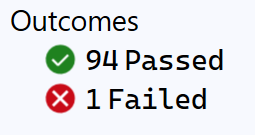
I like causing tests to fail


Test Results: 94 Passed, 1 Failed

I like it when tests start failing.

Not in a malicious and wanting to break things way.

I like it when I make a change to some code and then tests fail.

This could seem counterintuitive, and it surprised me when I noticed it.


If an automated test starts failing, that's a good thing. It's doing what it's meant to.


I'd found something that didn't work.

I wrote a test.

I changed the code to make the test pass.

Ran all the tests.

Saw that some previously passing tests now failed.


I want to know this as quickly as possible.

If I know something is broken, I can fix it.

The sooner I find this out, the better, as it saves time and money to find and fix the issue.

Compare the time, money, and effort involved in fixing something while working on it and fixing something once it's in production.


Obviously, I don't want to be breaking things all the time, but when I do, I want to know about it ASAP!


Saturday, March 25, 2023

Is manual testing going to become more important when code is written by AI?

It's part concern over the future of my industry, part curiosity, and part interest in better software testing.

An art-nouveau image of a woman
AI generated this image based on the prompt "software testing"

As the image above shows, it's probably not the time to start panicking about AI taking over and making everyone redundant, but it is something to be thinking about.

If (and it might be a big "if") AI is going to be good at customer support and writing code, it seems there's still a big gap for humans in the software support, maintenance, and improvement process.

In that most software development involves spending time modifying existing code rather than writing it from scratch, I doubt you'll argue with me that adding features and fixing bugs is a major part of what a software developer does.

This still leaves a very important aspect that requires human knowledge of the problem space and code.

Won't we, at least for a long time, still need people to:

  • Understand how the reported issue translates into a modification to code.
  • Convert business requirements to something that can be turned into code.
  • Verify that the code proposed (or directly modified) by AI is correct and does what it should?


Having AI change code because of a possible exception is quite straight-forward.  Explaining a logic change in relation to existing code could be very hard without an understanding of the code.

And, of course, we don't want AI modifying code and also verifying that it has done so correctly because it can't do this reliably.

There's also a lot of code that isn't covered by automated tests and/or must be tested by humans/hand.

Testing code seems like a job that won't be threatened by AI any more than other software development-related jobs. It's another tool that testers can use. Sadly I know a lot of testers rely heavily on manual testing, and so will be less inclined to use this tool when they aren't using any of the others already available to them.


Tuesday, May 17, 2022

Why a bug fix should "always" include new tests

Ok, maybe not always, but please don't start by assuming you're the exception.

(Note that exceptions should come with an adequate, documented explanation.)


So, imagine the scenario: You find something wrong in the code base, so you fix it.

Simple enough and almost certainly a good thing. 

But, consider the bigger goal that we don't just want a codebase with fewer bugs in it we also want a codebase that is easy to maintain, so that future bugs or changes (there will be some) are also easy (and quick) to address.

By adding or changing code without adding tests, we risk making future changes harder/slower.

Going back to the bug you fixed. How was it discovered? I'm going to assume it wasn't because of a failing test.

It was probably found by someone using the code/app/service/whatever or looking at the code. Either way, a manual process.

And how was the change tested? Again, I'm guessing manually.

So what happens when someone has to change something near or related to that code again in the future?

They'll have to test it manually again. But, also, they need to work out (or remember) how to test it manually and work out what all the scenarios they need to test are. Then they have to do that testing in its entirety and without human error. This is unlikely to be fast, thorough, or accurate.

But, also, what if the place where the error in the code was found wasn't the only place that error had been made? Have you really, manually reviewed the entire codebase to look for such an error? How do you know that you really checked *everywhere*? Was that a good use of your time? Additionally, how will you make sure that any future changes to the code don't reintroduce the same bug? Either here or in another part of the codebase? Are you really going to add that to the list of manual checks that are made as part of every code review? I suspect not.

Suddenly, taking the effort to write some automated tests doesn't seem like such a waste of time. Doing so can often be faster than manually retesting something while working on it. Also, having something that checks your code for bad practices, inconsistencies, and anti-patterns is much faster than manually reviewing all but the smallest codebases.


But, what if you don't know how to write tests? Or you don't know how to write a good test for this specific scenario? Well, you find out. Ignorance isn't an excuse.
If working on a codebase as part of a team, ask them. Your whole team wants to work together to create better software and that includes having a codebase that is easy and better for them all to work with.


Maybe I'll write more on getting started with testing or testing difficult things in the future. Don't worry, though; there are a lot of resources about this already on the internet (& elsewhere).


<RantOver />


Friday, June 18, 2021

I don't think you should only test manually

In response to my post When it's Ok to break the build some people thought I was trying to argue against using CI/CD tooling to test changes.

This isn't the case.

Only running tests manually and/or on your main development machine can be slow and a waste of resources.

Creating a draft PR to test against a large test suite and only raise to a full PR when everything has been confirmed as being ok is a good way of working.

Pushing local changes to a private branch with a CI/CD process running tests against it can be a good way of working.

Either of the above is also a good way of incorporating the execution of extensive test suites or tests that involve multiple environments or varied configurations that would be impractical to set up or maintain on each developer's machine.


My objections and concerns come when a full (non-draft) PR is raised before tests have been run.


BTW. I'm currently planning a book all about testing. It will focus more on the concepts than the details, but I think I can bring some new ideas to the subject. (Hopefully, I'll do a better job at avoiding confusion than I did in that other post.) If you want to know more, be sure to sign up for my (very occasional) newsletter. 

Saturday, June 05, 2021

Is this TDD? (When you can't do: Red-Green-Refactor)

I've been thinking a lot about testing recently.

Specifically, I've been thinking about using TDD and legacy code. (Yes, I've got Michael Feathers's book and will need to reread it. This is probably covered there.)

So, I've just received a bug report that I decide to work on and fix:

  1. I created some tests that recreate the issue. Running them verified that they reproduced the issue (they failed) so my tests were RED.
  2. I then changed the code so the tests passed. Now my tests were all GREEN.
  3. Then I tidied up the code a bit more. (I REFACTORED the code.)
  4. Finally, I ran the tests again to make sure they all still pass. They did.

  5. But then I thought of another edge case that wasn't currently tested but probably should be.
  6. So, I create a test. And, it passes!
Oh, no! It didn't go Red first, so I can't be doing "proper TDD"™.

I'm happy that the code does correctly handle (and document) this test case but how should I test it "properly"?

  • Change the code so the test fails? and then change it back?
  • Change the test so it fails? and then change it back?
  • Just leave it?
  • Something else?

What would you do?


BTW. I'm currently planning a book all about testing. It will focus more on the concepts than the details but I think I can bring some new ideas to the subject. (Despite what you may think by me asking this question.) If you want to know more, be sure to sign up for my (very occasional) newsletter. 

Monday, March 01, 2021

You must be insane to be a software developer

"The definition of insanity is doing the same thing over and over again and expecting a different result." - Probably not Albert Einstein.
Albert Einstein - pixabay

When debugging, I repeat myself frequently. Doing the same thing over and over again and hoping for a different result.

There are times I wish I had alternatives, but I know no other way, and so I rerun the code. Each time hoping that something will be different.

Rarely it is.

But it's those rare occasions that make this approach acceptable, if not necessary.


Note. I'm not talking about Heisenbugs. They're a separate, additional thing.


Sometimes repetition is the only option. An issue is observed or reported as only happening "some of the time." In such scenarios, the only available option is to run the code or perform an action to see when the bad thing occurs. Then try and identify what the difference was when it happened. 

This is important because, without consistent reproducibility of an issue, it's impossible to be 100% confident of an applied fix.

I know many developers and organizations who dismiss reports of occasional issues. If the problem doesn't happen all the time, so their thinking goes, it must not be with their software. Or they assume that the responsibility to fully identify the cause of the bug is not theirs. Or, they think their time would be wasted trying to reproduce such bugs consistently.

This comes down to perspective and priority.

Is the developer tasked only with writing the code? Or is the code a means to an end?  

I think the goal of writing code is to deliver value. I don't see any value being delivered by dismissing a bug report because it's not consistently reproducible. Instead, I see this as a challenge.

I assume that the person reporting the problem has given all the information they can. Now the challenge is for me to investigate the situation and find the solution. I'm a detective. 🔍

Being a bug detective might (and often does) mean repeating tasks to see when there is an inconsistent response and then trying to work out the cause. Such problems usually come down to one of four things.

  • It's time (or date) dependent.
  • It's machine/OS/configuration dependent.
  • It's a race condition.
  • It's dependent on the number of times the function is executed.

That time it failed, and the time before it worked even though the code hasn't changed. What else has changed? And how can I test that?


Note. I know there are obscure edge case bugs that it's not the best use of anybody's time to address. Let's assume that here I'm talking about bugs that the business deems worth spending time/money/effort fixing.


I wonder if there are better ways to investigate such bugs.

I wonder if there are tools to help with this. (I've found references to a few things that no longer exist but nothing current. 😢)


I will frequently run unaltered code and hope for a different result. Surely I'm not the only one...