Saturday, June 05, 2021

Is this TDD? (When you can't do: Red-Green-Refactor)

I've been thinking a lot about testing recently.

Specifically, I've been thinking about using TDD and legacy code. (Yes, I've got Michael Feathers's book and will need to reread it. This is probably covered there.)

So, I've just received a bug report that I decide to work on and fix:

  1. I created some tests that recreate the issue. Running them verified that they reproduced the issue (they failed) so my tests were RED.
  2. I then changed the code so the tests passed. Now my tests were all GREEN.
  3. Then I tidied up the code a bit more. (I REFACTORED the code.)
  4. Finally, I ran the tests again to make sure they all still pass. They did.

  5. But then I thought of another edge case that wasn't currently tested but probably should be.
  6. So, I create a test. And, it passes!
Oh, no! It didn't go Red first, so I can't be doing "proper TDD"™.

I'm happy that the code does correctly handle (and document) this test case but how should I test it "properly"?

  • Change the code so the test fails? and then change it back?
  • Change the test so it fails? and then change it back?
  • Just leave it?
  • Something else?

What would you do?


BTW. I'm currently planning a book all about testing. It will focus more on the concepts than the details but I think I can bring some new ideas to the subject. (Despite what you may think by me asking this question.) If you want to know more, be sure to sign up for my (very occasional) newsletter. 

Friday, May 28, 2021

Free t-shirts for XAML developers

 Today I got to celebrate the Rapid XAML Toolkit officially reaching 1500 installs. 

partial screenshot of the VS marketplace showing 1500 user installs for Rapid XAML Toolkit
(It has more users than this but that discussion can be for another day.)

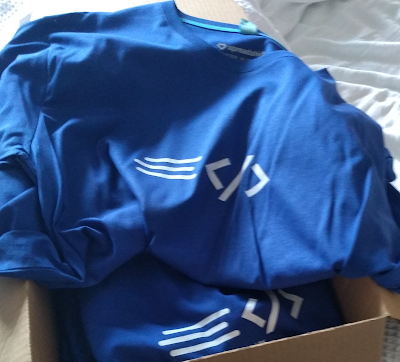
I was also reminded I still have this box of t-shirts under my desk since the start of last year and obviously haven't been able to give them away at the conferences I was originally planning to.

Bok of blue t-shirts with the Rapid XAML logo

So, let's have a give-away.

I have t-shirts and a desire to improve and promote my tools.

You have an interest in obtaining a t-shirt and ideas that may help me improve the tool.

How's about this:

To enter the draw for a t-shirt:

Then on June 10th 2021, I'll randomly pick some people who've created issues and send them t-shirts.


Obviously, the goal here is for me to gain some useful new feature requests or suggestions. I'm also interested in how people are using the toolkit and so if you don't have any ideas for new features it's also useful for me to know how it's being used (telemetry is deliberately very limited) so please share what you've done with it or how it's helped.


I couldn't possibly say if leaving a positive (5⭐) review in the marketplace will help your chances of winning, but it definitely won't hurt ;)


Conditions:

  1. This is for fun and to help me tidy my "office"
  2. Any created issues that don't contain useful (as I determine it) details will be excluded from the draw.
  3. The number of winners will depend on the number of entries and the number of t-shirts I have (I don't know right now) 
  4. Maximum of one prize per person but feel free to make multiple feature requests.
  5. The selection of winners will be as "random" as I can easily manage.
  6. Winners will be notified once and will have a limited amount of time to claim their prize. (I'm not going to chase winners indefinitely.)
  7. I'll pay postage. Import duty, taxes, or anything once I've posted it are on you.
  8. Don't like how this giveaway is being run? Tough.
  9. If this is successful I may do this again. No promises.

Sunday, May 16, 2021

Rapid XAML Toolkit v0.12 - Now with extra Xamarin.Forms related goodness

After a longer than desired period of time, version 0.12 of the Rapid XAML Toolkit is now available.

If you're not familiar, the Rapid XAML Toolkit is my side-project that's grown out of control. It provides a number of tools to help developers working with XAML files inside Visual Studio.

In addition to a load of bug fixes, this version adds more functionality for working with the XAML files of a Xamarin.Forms project.

The image below shows examples of some of the things that it can now identify inside the editor.

Screenshot showing issues highlighted in the editor

In the screenshot above you'll see that it highlights a number of different issues as either suggestions, warnings, or errors. Wherever possible it includes automatic fixes or will point you to more information about why the issue has been highlighted. Like Roslyn Analyzers in C#, you can also selectively disable or change the error levels of each issue too.


Join the more than 1500 people who use it every day - INSTALL it now!


Why v0.12? Why not v1.0 yet?

I'm trying to balance functionality and expectation.

It's not a preview but it doesn't yet have everything that I want it to. Once it includes examples of all the areas that will show its full potential, I'll upgrade it to version 1.0.


Friday, May 14, 2021

Getting started in "app" development - what do you need to know from a conference session?

Recently, I've been critical of conference sessions that say they are focused on "app" development without saying what type of app they mean.

If someone only works with "mobile apps," that's what they assume when they hear "app."
If someone only works with "web apps," that's what they assume when they hear "app."
If someone only works with "desktop apps," that's what they assume when they hear "app."
And so on for other types of "app."

I first encountered this many years ago when I had a version of the following conversation:

Me - I build apps.

Them - You mean web apps?

Me - No, mobile apps?

There are now so many kinds of "apps" that on its own, the word "app" doesn't mean anything. Or rather, it could mean one of many things. It needs clarification.

Going back to conferences. In the past, I've attended sessions that I thought were going to be about one type of app that turned out to be another. I know many others have done the same, and they have been rightly vocal about the misrepresentation of what the session would be about. This ambiguity doesn't benefit anyone and can end up wasting the time of lots of people.

This year I've encountered a new, related idea. A conference session for people building any kind of app and with any level of experience to share their knowledge so attendees can learn from each other.

I'm a big fan of developers learning from (and with) each other, but this type of session raises lots of questions and concerns for me.

On paper, this seems like a good idea from an organizer's perspective. It can be seen to empower attendees, it has the potential to give people the information they're after, and it doesn't involve a lot of preparation.

Sounds good in principle, but what about the attendees?

Who's going to come?
I think there are three groups of people who might come.

  1. Those wanting general, broad information. For these people, they may learn something useful.
  2. Those coming with specific interests and questions. These people may or may not get what they want (or expect) and have a large potential for being disappointed.
  3. Those wanting to come and share their knowledge (most probably in a specific area.) These people may need careful (skilled) moderation to stop it from being a session driven by them. Plus, how do you balance what the more experienced attendees want to talk about or share and what the less experienced attendees want to learn? These may match up, but it risks being a waste of everyone's time if they don't. The broader the number of types of "app" being included, the greater the chance of a mismatch of reality and expectations.

So, lots of opportunities for it to go wrong, but could a better alternative exist?

What would a good/useful session for ANY app developer look like?

Let's start by thinking about what makes someone an "app developer". There are many different kinds of developers but for simplicity, let's divide them into two categories: those that build software with a UI, and those that don't.

Of course, there are edge cases and exceptions, but  I think it's broadly true to say that any software with a UI could be considered an app.

Now we have an idea of what an app is, there's a key factor that we must remember. For the most part, only a small part of any software with a UI is comprised of the UI. Most of the code and development effort goes into things that aren't the UI.

Yes, the UI is important and may be created from multiple technologies, but these are only a small part of the overall app and what a developer needs to know.

In terms of the broad topics that an app developer needs to know, these are the same as what any developer needs to know.

These include:

  • The languages, tools, and frameworks they'll use.
  • Structuring/architecting a codebase.
  • Testing.
  • Good development practices. (however you define them)
  • Understanding the user
  • Understanding the business
  • How to work as part of a team
  • Support, maintenance, and updating software.
  • Packaging and distributing software. (Yes, even non-apps need this.)
  • and many more...

These are all massive topics, and there's no way to get into any level of useful depth in any of them (let alone all of them) in a single session.

This is all to suppose a conference session covering all the things a developer needs to know is a useful and a good use of attendee's time. It's little more than "here's a list of things you need to know."  Is this a good use of 30-60 minutes as part of a large conference? I don't think so. It sounds like an outline of a curriculum that could take months or even years to cover.


Now, I've never run a massive conference with thousands of attendees. I don't know what the goals and aims of the different sessions are. I just hope there are some excellent reasons for including a general-purpose session that gets lots of different developers with different experience levels in different technologies together to talk. I just don't know what they could be.

The goals and desires of the organizers and attendees must always be considered when planning sessions.

I have organized and spoken at many (>100) smaller events and have recently been thinking a lot about what these will look like once the pandemic is over. Seeing the above-mentioned session has seemingly touched a nerve with me, and I wanted to write something to help process my thoughts. More of my thinking will likely follow...

Monday, March 29, 2021

Here, I made a way to navigate between ANY files in Visual Studio

Being able to navigate between different parts of code is really useful. You simply hold down the ctrl key and click on an item, and you're taken to the definition of a method, or class, or whatever. Or, maybe you use a shortcut or context-menu entry to do the same. However you do it, it makes navigating a codebase much easier and saves untold time.

But what if you want to navigate between files that aren't all code, or in the same programming language?

Visual Studio doesn't support this, but don't worry, I can help. 

Introducing CommentLinks, a Visual Studio extension to enable links between any files from within the Visual Studio code editor.

the extension logo
The idea is simple. In your code, you put "link:" followed by a filename, and then a button (see below) is added that, when clicked, will take you to that file.

button shown next to the text "link:MapManager.js"
It will search for files anywhere in the solution. The file doesn't have to be in the same directory, project, or in any project. It just needs to be visible in the Solution Explorer.
If there are multiple files in the solution with the same name, you can specify the one to find by including the directory name(s) to be clearly unique. e.g.:

link:otherjs\device.js
or
link:otherjs/device.js (either directory separator)

Want more than simply opening a file?

You can open the file at a specific line by adding "#Lnn" (where nn is the line number) after the file name. e.g.:

Link:plainfile.txt#L33

You can open a file and search for specific text by including it after a colon (:) immediately after the filename. Or after "#:~:text=" to match the convention for text fragment anchors.

link:device.js#:~:text=Device.prototype.getInfo
link:device.js:addConstructor

And, it can handle spaces in the search text or filename by using percent-encoding (so a space character is replaced with "%20") or by putting them in quotes (single or double.) e.g.:

link:device.js:"getInfo = function ("
link:"device.js:getInfo = function ("
link:"name with spaces.js"
link:misc%20files/other%20device.js

You can navigate within the same file (to search for subsequent occurrences of text) by specifying the file's name and then the search text.

You can open any file on disk by specifying the full path. e.g.:

link:C:\Temp\TestFile.txt

You can even use it to run arbitrary commands by adding "run>" after "link:" This can be useful to open other applications, open files in their default application, or to run commands with custom schemes/protocols. e.g.:

link:run>cmd.exe
link:run>mockup.pdf  (assuming in the same directory)
link:run>ms-settings:easeofaccess-highcontrast

Don't want to use "link:" before the file name?
That's ok. You can change this to any text you want by going to Tools > Options > CommentLinks and changing the Trigger word.
partial screenshot of options dialog showing the trigger word setting


The name might be misleading. It doesn't just work with comments but anywhere in the code file. The name came from the original intention and the fact it was expected only to be used in comments. It works anywhere.


Get it from the marketplace and let me know what you think.

Want to see it in action? See this quick video I made previously showing some of the features.


This is part of a collection of Visual Studio extensions I have made. You can see them all at https://marketplace.visualstudio.com/publishers/MattLaceyLtd 


I originally created this at the suggestion of one of my GitHub sponsors. Not only am I really grateful to the people who sponsor me (the current ones and those who have sponsored me for a period of time in the past, but I also try and do things to help them.

I can't always build everything my sponsors want or need, but I'm inclined to help them more. 😉

This was built for a specific niche use-case, but other people have already found this extension and requested many of the features it has. It turns out that working with multiple file types in VS isn't something that everyone needs to do, but the people who have to do this are very disappointed with what comes in the box and are keen to see additional capabilities added.

One such person who wanted a new capability even paid for this to be added. They wanted a feature I wasn't sure about adding. I was going to suggest to them that this was the sort of thing I'd be more inclined to do for a sponsor, but before I could email them, they'd sent me some money. Not a lot but not a trivial amount. That feature was added quickly ;)

I'm still not entirely sure how I feel about someone giving me some money and then asking for a feature. Still, I didn't want to discourage someone enthusiastic about the project. I especially didn't want to discourage anyone willing to give money to an open-source project.

Based on the time required to implement and support the feature, it's less than I would charge for regular work at an hourly rate, but it was certainly appreciated.