Thursday, May 22, 2025
Tuesday, March 25, 2025
Of course documentation shouldn't be like this!
Publishing this several months after I wrote it - the issues were eventually addressed and I managed to unblock myself.
Monday, November 04, 2024
not writing about the cutting edge
Sunday, April 07, 2024
Reflecting on 1000+ blog posts
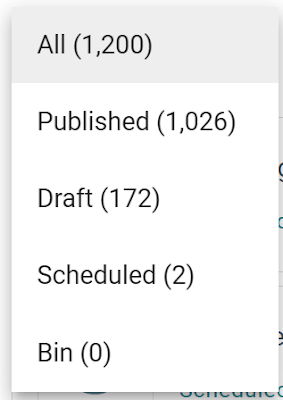
These are the numbers I care about.
The one most other people care about is 2,375,403. That's the number of views the articles have had.
But this isn't a post about statistics. This is a post about motivation and reward.
I started writing this blog for me.
That other people have read it and got something from it is a bonus.
If I were writing for other people, I would write about different topics, I would care about SEO and promotion, and I would have given up writing sooner.
I get lots of views each day on posts that I can't explain.
I know that most views of this blog come from "the long tail," and Google points people here because there is a lot of content. The fact that I've been posting for 17+ years also gives me a level of SEO credibility.
There have been periods where I have written very little. This is fine by me. By not forcing myself to publish on a particular schedule, the frequency of posting doesn't hold me back or force me to publish something for the sake of it.
I publish when and if I want to.,
Some people need and/or benefit from forcing themselves to publish on a regular schedule. If that works for you, great. If it doesn't, that's okay, too.
Others might think a multi-month gap in posting is bad, but if that's what I want or need, it's okay. Over a long enough period, the gaps are lost in the overall volume of posts.
I'm only interested in writing things that don't already exist anywhere else. This probably holds me back from getting more views than if that were my goal, but it probably helps me show up in the long tail of niche searches.
And yet, some people still regularly show up and read everything I write. Thank you. I'm glad you find it interesting.
Will I keep writing here? I can't say for certain but I have no plans on stopping.
I'm only publishing this post because I thought I might find it useful to reflect on all that I've written, and 1000 posts felt like a milestone worth noting, even if not fully celebrating. Originally, I thought I'd want to write lots about this, but upon starting it feels a bit too "meta" and self-reflective. I don't know what the benefit is of looking at the numbers. What I find beneficial is doing the thinking to get my ideas in order such that they make sense when written down. That's, primarily, why I write. :)
Tuesday, March 12, 2024
Reverse engineering a workshop
I've been working on writing a technical workshop. I've not done it before, and I couldn't find any good, simple guidelines for creating such a thing.
Having asked a few people who've delivered workshops in the past, the advice I got was very generic and more about the workshops they've proctored rather than how to structure one or put one together.
So, rather than make it up, I started by trying to reverse engineer what good workshops do.
I want the workshop to be fully self-paced and self-guided. If it can be used in group or "instructor-led" scenarios, that'll be good, too, but I don't have any plans (yet) for this.
From looking at many workshops I've completed and thinking back to those I've participated in in the past, I was struck by how many take the approach of showing a completed project and then simply listing the steps to create it. I find this approach to often be disappointing.
Yes, as a participant, I get the satisfaction of having created something but it's not something new or necessarily specific to my needs. More importantly, the reasons for each individual step weren't explained, and the reason for taking an approach when others are available (or even what the other approaches are) wasn't given. This means that I don't get the wider knowledge I likely need to be successful. Is the intention that in completing a workshop, you have the knowledge to go and build other things and the confidence to do so, having done it once before? It probably should be.
What I find many workshops end up doing (intentionally or otherwise) is providing a series of steps to recreate a piece of software and assuming that's enough for the participants to then go off and successfully create anything else.
Yes, saying, "Anyone can follow our workshop and create X", is great. But that's not the same as a workshop that teaches reusable skills and provides the knowledge needed to go and create your own software.
I want to create a workshop as a way of teaching skills and introducing a different way of thinking about a topic.
Aside: what's the difference between a workshop and a tutorial? I think it's that workshops are longer. Possibly a workshop is made up of a series of tutorials.
After initially struggling, I eventually concluded that a workshop is like teaching anything else. With clear learning goals and a structure, it's a lot easier to plan and create.
In this way, writing the workshop was a lot like writing a book. Only without an editor chasing me for progress ;)
More thoughts on this topic another day. Maybe.
Although, it has got me thinking about what I'll write next...
If you're interested in how my efforts turned out, you can see the results of them here.
Sunday, March 03, 2024
Lack of nuance
No nuance is almost always incorrect!
Yes, "almost" is very important in that statement.
If you get a response/answer/instruction without any acknowledgement of the nuances, you're almost certainly not getting the full picture.
How do you know the importance of what is missing, if you don't know what's missing?
Wednesday, February 28, 2024
Reviewing documentation is like reviewing code
Two quick, but key points.
1. What is it meant to do? And, where/what/who is it for?
You can't review code fully unless you know what it's meant to do. You might be able to point out if something doesn't compile or account for an edge case that hasn't been covered, but if you can't say if the code does what it was meant to do, you can't provide a useful review.
It's the same with documentation. If you don't know what the document was intended to achieve, communicate, or teach, how do you know it is correct, appropriate, or does what it's meant to?
2. Take advantage of tools before you involve people.
Use spelling and grammar checkers before asking someone to review it.
It's like asking for a code review on code that doesn't compile or meet coding standards.
Saturday, February 12, 2022
Some quick thoughts about writing a first book
A few times in the last couple of months, I've been asked about the writing process from people who are thinking about or planning to write their first technical book.
Here are some of the things that I'm telling those people. I'm putting it here because others might be interested and because it will make it easy for me to find (and refine?) in future, if necessary.
- It's LOTS of hard work. It is very unlikely to earn you much (any?) money. (Especially if you're used to being well paid for your time as a developer.) Are you sure you REALLY want to do it?
- Be prepared to spend (you should be spending) more time planning and re-writing that writing.
- Interview the publisher. Assess if you want to work with them like you would (should) any employer. Do you get on with these people? Do you want to spend lots of time talking with them? Can you trust them?
- Speak to authors who have worked with the publisher before. Find ones with good and bad experiences. Find out who at the publisher the author worked with. It's the people that matter more than the publisher as a whole.
- Understand why the publisher wants a book on the subject, and why they think you'd be good to write it.
- Technical reviewers are at least as important as the editor. Get lots of feedback from the technical reviewer on your detailed outline for the book. They'll help avoid any big issues not being identified until it's too late (there's not enough time) to fix them.
- Write ALL the code before estimating the wordcount for a chapter. If your book is mostly going to be explaining code or APIs. Yes, this means you have to have a really detailed plan and have done a lot of the work to be able to write the outline and before you sign a contract and start "writing" the book. For reference, I think four lines of text to every one line of code is a good guideline as it's explaining, not just showing the code that's important. You'll also discover that code is actually a lot more lines of code than you imagine in advance.
- Have a backup plan for what to do with your planning work even if you don't finish the book. (A series of blog posts is an obvious answer.)
- Avoid working with a publisher that has very strict structure and expectations for a "type" of book if that's not what you want to write. You probably won't get as much support as you'll want/need and it's harder for them to help you.
- Triple check everything. If it's your name on the cover people will attribute any mistakes or issues to you. (Don't always rely on other people using the change tracking functionality of software or documents correctly.--Guess how I learned this.)
- Ask the publisher for the guidance they give to new authors after they sign the contract, but before you sign a contract. These guidelines often include lots of useful information that will help you write the outline--that will lead to the contract. Consider it a red flag if they won't share it. Speaking of which...
- Trust your gut. I've not (yet) met any authors who had doubts about a publisher at the start but they turned out to be unfounded. I have met many who wish they'd paid more attention to the things the red flags they saw early in the process.
I hope this helps.
Wednesday, January 12, 2022
Reasons to ask a question
I've been thinking a lot about communication (I know--fun, right?!) and especially about questions. This is because asking and responding to questions (not just answering them) is a large part of communication.
So, 12(+) reasons to ask a question:
- To get an answer.
- To force others to think about the question's topic.
- To encourage someone to think about how they'd answer (even if they don't.)
- To get attention.
- To get a response (that isn't a direct answer.)
- To show (admit?) that you don't know (everything.)
- To show a willingness to learn.
- To show that asking questions is good/ok/acceptable/encouraged.
- To show an example of questions that can be asked.
- To show that you've thought about (or researched) the subject enough to be able to ask smart, informed, appropriate questions.
- So others can hear the/their answer.
- Never for no reason.
- Other?
I know the above is a generalization, and it won't apply to all scenarios but is a helpful summary of the things to consider.
Tuesday, December 21, 2021
Are technical computer books supposed to make you laugh out loud?
If you are using the digital version of this book, we advise you to type the code yourself or access the code from the book’s GitHub repository (a link is available in the next section). Doing so will help you avoid any potential errors related to the copying and pasting of code.
Honestly, I laughed out loud when I first read this.
Do you find manually retyping something (already in a digital format) less error-prone than copying and pasting?
Am I unusual in finding copying (& pasting) something being less likely to result in any potential errors than typing it myself?
I get that typing something yourself can help when you're learning something and want to be clear about what code you're adding and why. But, cutting and pasting has always been less error-prone than typing.
Monday, December 20, 2021
Questions to ask BEFORE asking a question
I've been thinking a lot about communication (I know--fun, right?!) and especially about questions. This is because asking and responding to questions (not just answering them) is a large part of communication.
So, 12(+) questions to ask yourself before asking a question:
- Can I work out the answer myself?
- Can I find the answer myself?
- Will the person I'm asking know the answer?
- Can they know the answer?
- Will they be able to give me an answer if they know?
- What will it cost them to answer?
- Will this impact my ability or opportunity to ask other questions?
- Will others want to know the answer?
- Have others asked the question before? and what, if any, answer did they get?
- Why isn't the answer easily/already available?
- Is this the best time to ask? And if not, when is?
- Have I been paying attention to what has been said already?
- Other?
I know the above is a generalization, and it won't apply to all questions but is a helpful summary of the things to consider.
Not all are always relevant, appropriate, or useful, but all are worth considering before asking (or even answering) a question.
Sunday, December 19, 2021
Questions to ask BEFORE answering a question
I've been thinking a lot about communication (I know--fun, right?!) and especially about questions. This is because asking and responding to questions (not just answering them) is a large part of communication.
So, 12(+) questions to ask yourself before responding when asked a question:
- Do I know the answer?
- Can I tell them the answer? (If I know.)
- Should I tell them the answer?
- Why do they want to know?
- What assumptions do they have that have led to (or are evident from) the question?
- Why do they think I know (or can get) the answer?
- What will they do with the answer I give them?
- Is there something I can give them better than the answer to their question?
- What led them to ask this question?
- Are other people likely to have this question?
- Where else can I share this answer?
- What type of answer are they expecting? (long, short, etc..)
- Other?
I know the above is a generalization, and it won't apply to all questions but is a helpful summary of the things to consider.
Not all are always relevant, appropriate, or useful, but all are worth considering before answering a question.
Sunday, November 28, 2021
How to respond to a question?
I've been thinking a lot about communication (I know--fun, right?!) and especially about questions. This is because asking and responding to questions (not just answering them) is a large part of communication.
So, 9(+) ways to respond when asked a question:
- Ignore the question. (& the person asking?)
- Refuse to answer.
- Admit that you don't know.
- Admit that you can't answer. (yet?)
- Use the fact that the asker has now stopped talking and take the opportunity to talk about what you want to.
- Pick a word from the question and talk about that. (Because not properly listening, or as a way to avoid answering the question directly.)
- Talk about a topic related to the question. (Because that's what you want to talk about, or as a way of avoiding the actual question.)
- Directly answer the question.
- Provide information/suggestions/ideas related to the question that will allow the asker to find (or decide) the answer themselves.
- Other?
I know the above is a generalization, and it won't apply to all questions but is a helpful summary of the options that are generally available.
Not all are always possible, appropriate, or useful, but all are worth considering before asking (or even answering) a question.
Thursday, November 25, 2021
I learned a shocking secret about many technical books
One of the reasons I wrote a book about the Uno Platform with a new publisher was to learn more about the book publishing process so I can look to self-publish in the future. One of the things I learned shocked me.
This fact is that, apparently, many authors don't check that the source code that they include in their books actually works! Additionally, many editors and publishers don't check that the source code that they include in their books actually works either!
I didn't want to be like this.
As part of my process for testing and verifying that everything a chapter was complete, I'd work through the contents of a chapter, following each step and making sure that it included everything exactly as it should be. This would mean starting with a new project, following each step as written, and copying (cutting and pasting) the code into the editor as I went.
For each chapter I wrote in the Uno book, I did this whole process at least three times. Not wanting to rely on assumptions or trust that what I thought I'd written, or knew what to do matched what was in the manuscript. I'd repeat the process after each round of reviews and when I made big changes to the order of steps or the code so that everything still worked as intended.
For the final round of my testing, I thought it might be an interesting artifact to record the process and so I did. Below are videos for the chapters I wrote showing how I went through each chapter to check all the instructions (& code) worked. Sorry, the sound isn't great but hopefully it's good enough if you really need to hear it.
Chapter 4 - https://youtu.be/OTr1yT_4W_g
Chapter 6 - https://www.youtube.com/watch?v=CIpMcKmTehA
Chapter 8 - https://www.youtube.com/watch?v=oGyMGEut5Zw
Any questions about these chapters (or the book in general) I'm sure you can work out how to get in touch ;)
Monday, August 30, 2021
Creating Cross-platform C# Applications with Uno Platform
That sounds like a good name for a book. Doesn't it? ;)
And it is.
I know that when I finished my first book I made a specific point of calling it "my book and not my first book."
Save your judgment.
Like most writers, after finishing my first book, I wasn't in a hurry to ever write anything again.
But things, and times, change.
While I wasn't in a hurry to write another book I was still using writing as a way to communicate and pass on information.
Last year, I realized there were specific things I didn't know about the writing process and set out to understand them better. I wanted to learn so I could be a better writer and communicate more effectively. So, I spent much of the first pandemic lockdown reading books about writing, watching videos about writing, listening to podcasts about writing, and attending online workshops about writing.
Fast forward to earlier this year, and I was approached about writing a book about Uno Platform.
I wasn't in a position to write a whole book but the publisher called my bluff and agreed to me becoming a contributor to one. I figured I could write four chapters of a book and learn more about the process that would help me with my own future self-publishing plans. (More details of these at another time.) It would also be a way to test if I could apply what I'd been learning.
When it suits me, I can be quite assertive and I had strong ideas about what this book should and shouldn't be. I was keen that if I was writing the book, it would be distinctive. There's no point in me doing what just anyone could do. I wanted to make this my own. (Well the chapters I was writing, at least.)
When it comes to technical books there is a convention that over the course of the book the reader will build a basic app and each chapter will add to it as a way to learn about and demonstrate, a new feature or area of functionality. I didn't want to do this and my reasoning is threefold:
- I didn't want it to be like every other book.
- I'm not a fan of this convention as it tends to strong-arm features into an app in an unnatural way. I knew trying to do something I'm not a fan of would be frustrating and as writing a book is already a slow, hard, frustrating process this wouldn't be good for my sanity or motivation.
(I mean no offense to people who write such books. I have great respect for you as you're doing something I can't.) - Most importantly, it didn't fit the subject.
Uno Platform enables the creation of an app that can be compiled for multiple platforms but the number of cases where it is appropriate to have the same app run on all those platforms is very small. Instead, I thought it more appropriate to show how Uno Platform can be used to create apps for a number of different scenarios that demonstrated appropriate features running on appropriate devices/platforms.
Thursday, March 04, 2021
Never just "should"!
TLDR: never use "should" without explaining why.
![]() |
| Photo by Brett Sayles on Pexels |
How many times today have you used the word "should"?
- It would be nice if this was included, but it isn't strictly necessary.
- It's used to indicate or identify something that can be deferred until another time.
- Or it's understood to mean something that can only be left out without a VERY good reason.
3. SHOULD
This word, or the adjective "RECOMMENDED", mean that there may exist valid reasons in particular circumstances to ignore a particular item, but the full implications must be understood and carefully weighed before choosing a different course.
Thursday, October 09, 2008
Controlling your life on-line
Tuesday, September 09, 2008
Not using a system properly?
I can see how they might not use it as it was intended or designed, but properly?
Assuming that properly means the same a correctly. (http://www.google.co.uk/search?q=define%3A+properly)
If a system can be used in a way other than a correct one, doesn't that mean that the program is at best flawed or, at worst, contains errors?
I suspect that this phrase ("not using it properly") is typically used when they mean not as intended. If that is the case it means that the program is unnecessarily complicated. Doesn't it?
Tuesday, May 27, 2008
Writing for the computer screen
Gotchas:
- Less reading time
- On-screen text is tougher for the reader - to read
- The computer or reader can alter the format
- On-screen text competes with other distractions
- The screen can hide errors - things can look finished, even when they aren't
Tips:
Structure
- Use the inverted pyramid style of writing
- Provide an overview and signposts
- Use hyperlinks effectively
- Use smaller chunks of text
- Write succinctly
- Use bullet points and lists
- Leave plenty of white space
- Avoid using italics
- Choose your font carefully
- Use a sufficiently large font
- Use simple colour contrasts
Tuesday, March 25, 2008
Software documentation
Some examples:
Internal
Explanations of software.
- What it is for
- Who the intended users are
- How it works
- How it is developed
External
User guides
- System requirements
- Basic (user guide)
- Advanced (user guide)
- Installation
- Upgrading
- Troubleshooting
- Moving an installation between machines