Friday, November 22, 2019

SimpleTesting - Get started with coded tests in .NET

tldr: I made a thing. Get the NuGet package and read more on GitHub

I have a theory: Getting started with writing coded tests is harder than it needs to be.

I wanted to make it easier to get started by getting the number of things that need to be installed or learned before it's possible to start writing tests.

The value of writing tests is better appreciated once some have actually been written, so I've made a way to put off the things you can think about later:

  • Which test framework to use
  • Which Test runners
  • What Mocking frameworks
  • What Isolation frameworks
  • What are Mocks/Stubs/Fakes and when/how should they be used
  • How to mark up tests and test classes
  • How to indicate success or failure
  • What counts as a "unit" test
  • How many, and what, different things need to be installed.


That's a lot of things to learn or be a distraction when the aim is to write tests.

My solution requires:

  • Only installing a single NuGet package.
  • No special markup needed (attributes, naming conventions, etc.)
  • Forces tests to be clear about whether they pass or fail.


To use it:

  • Have a class that inherits from `SimpleTesting.IContainSimpleTests`.
  • Have a parameterless constructor. (One is created by default if you don't add a constructor.)
  • Create public methods that return `bool` (or `Task<bool>`)
Those public methods are then "automagically" turned into tests when the code is compiled.


And it generates tests (in a different namespace to the original class) that Test Explorer picks up and can be run from within Visual Studio.
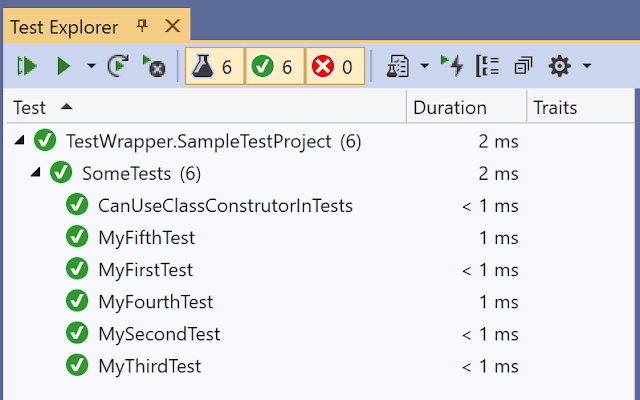
Examples of generated tests inside Test Explorer


It doesn't do everything that a full test framework does but you can use one in combination with these "simple tests."


I'd love to hear your thoughts on this?

Thursday, November 21, 2019

Make the repository public - no-one cares about your code

Just make the repository public (assuming it contains no Publicly Identifiable Information or embedded secrets.)
If it does, you should remove them anyway.

The 'make repository public' setting in GitHub

There are common fears about making code public.

  • What if someone takes it and makes something with it that they start selling or otherwise competing with my project?
  • What if someone laughs at it?
  • What if someone copies something?


So what? No-one is paying attention to what you put on-line. (If they were I doubt you'd have nothing better to do than read my blog.)

  • Use an appropriate license to address possible competition concerns.
  • Ignore the haters.
  • Assume that something will be copied.


I've heard it said many times (sorry, I can't attribute the original source) that "any code on the internet will eventually end up in production."

And if it does, that's ok. I don't feel responsible for someone else's codebase if they copy something I wrote (possibly many years) previously and use it differently without understanding the nuances and possible consequences.

Searching GitHub is now my default for working out how to use an undocumented API.

By searching for uses of the method/class/whatever, I can see how/if someone else has made it work. Not in a contrived example. But, in a real (hopefully) production code-base. If they hadn't made their code public I would have been stuck. I see making as much code as possible public as a way of paying it forward to other developers.

Seeing that an API has been used successfully by someone else (and how) is incredibly valuable and has helped unblock me from many coding challenges in the last year.
If I can make my code public and potentially help others in the future, then I'm all for it. I'm sure that the only reason someone else will look at my code is if they find it as the result of a search.


While I was sitting on the draft version of this post, I received this message.
"You can't just create a blank repo and leave me hanging!"
"Oh, no!" I thought. "This contradicts what I wrote in that (this) blog post."
I'm not sure it does, though.
This was a question about a name. The name of a repository.
(I find creating empty repositories for possible future projects cheaper than buying a domain and never doing anything with it.)

The name of the repository sparked interest, and they wanted to know more of what I intended for something with that name. (Hopefully, this suggests it's a good name.)

However, with more than 100 public repositories in my GitHub account, I can't recall ever having a random email asking about any of the code they contain.

I think my point still stands.


Wednesday, November 20, 2019

Where's the financial value in the code I write?

tldr: this is very self-reflective and likely has no value to you. I won't be offended if you don't read further.


I don't get it.
Why are software developers paid so much? Especially when so much software is so bad?
How/Why have people paid me to write code in the past?
How can I get someone to do so again?
Especially when I write so much code for free at the moment?

💰❓

I've been thinking about money and getting paid for writing code.
This isn't meant as a dig at anyone. I'm just thinking about myself.
In part, this is because I don't have a job (or any paid work at the moment.)
Another part of this is that I haven't earned any money in the last six months.
And the final part is that I know I can't keep not earning money forever.

It might seem obvious that I should just get a job.
However, due to my family situation, I can only work remotely and part-time.

I also don't know what I want to do.
Some of the things I've worked on in the past aren't as appealing anymore. Or things that people are as interested in.

The idea of "writing code to earn money" VS "earning money to write code" has been playing on my mind. Ideally, I'd like to be in a place where I can write the code I want and still earn money. Having spoken with other people, that I've been in this position before is an exception and I may need to acknowledge this past privilege and be more realistic in the future.

I'm not sure:
- Does what I do provide value? To whom?
- What (and how much) value does what I'm capable of doing provide?
- How do you put a price on something?
- Who sets market rates? What are they based on?
- What do I want to do?

I still have some time before I have to be earning some money but I'd rather not get to the point where I'm only earning enough to get by each month.

If you've got this far and happen to have something I might be well suited to and you'd be willing to pay for, please get in touch.


Tuesday, October 29, 2019

Microsoft want to know if Rapid XAML Toolkit functionality is useful


The Rapid XAML Toolkit is a developer tool I've been working on but haven't been very good (yet) at promoting.

It does a few things, including providing the ability to generate XAML for a [view]model and provide additional issue detection with code fixes, the way Roslyn Code Analysis does with C# (& VB.Net).

Anyway, as they do from time to time, Microsoft is currently carrying out a developer survey relating to Data Binding to data in Windows Desktop Applications.

There's a very interesting option for an answer to one of the questions (image below)

Which, if any, of these items would help with application development? [ ] Generation of XAML templates from data model with bindings to properties

That's one of the things that you can already do with the Rapid XAML Toolkit!
And the Rapid XAML Toolkit is hosted in a Microsoft owned repository!

Clearly, RXT needs better promotion within the Visual Studio tooling team. I'll get on that, and you can help too.


If you develop Desktop apps, build with XAML, or otherwise work with databases on Windows, please fill out the survey, and be sure to select the option above.


Friday, October 25, 2019

How testing helps - a real world example

I've been thinking about software testing recently and found the number of real-world examples of how it's been used to be lacking. So, here's an example with real numbers to show the difference that having tests makes.

I have a project (Rapid XAML Toolkit) that does some complicated things. I've often said that I couldn't have built the functionality that's there without having tests for it. To back that up, I want to share some stats and show how having tests has helped over time.

The functionality in question uses Roslyn Code Analysis to look at C# and VB.Net code and generates XAML based on it.

The current functionality only generates XAML based on properties and ignores methods. To meet a new requirement, the tool now needs the ability to be able to generate XAML for some methods too. Testing to the rescue.

Background

The current functionality might seem quite simple, look at the code file, find the properties, and generate some XAML. At that level, it is, but there are some configurable options for what is generated that add complexity, and there are probably more ways to write properties in code than you may at first consider.

It's not the most complicated thing in the world, but it's definitely more complicated than something I can keep entirely in my head and not a group of scenarios I'd want to manage or have to repeatedly test by myself.

I've known business logic much more complicated.

Before making this new change, there were 744 tests on the code.
I created these tests when writing the original functionality. The value of these tests is that they document what the correct behavior of the code should be. These were mostly created before the feature was fully implemented, and it provided a way of knowing when the code correctly did everything it should when all the tests passed.

How these tests helped in the past

These tests contain many examples of input for different scenarios and the output they are supposed to produce when everything works correctly.

If I didn't have executable [unit] tests, I could have created documents that explained how to test everything manually, but the documentation requirement would have come with its own management overhead. Running the tests would have been time-consuming and error-prone because, well, I'm human.

In addition to the tests mentioned above, I also have a separate test process that crawls all the code files on my machine and ensures they can be processed without any unexpected scenarios being encountered that could cause the code to fail.
This has found a couple of instances where code was structured in a way I'd never encountered before. These examples became test cases, and then I changed the code to fix them. This was done in the knowledge that I could tell if my changes made to cover the new scenario changed any existing functionality because the current tests would start failing.

There have been a couple of times where other people have found scenarios I'd not considered and were not covered by the code. You might know these as bugs. How did I fix them quickly? Well, by adding new tests to document the correct behavior for the new input scenario, then changing the code to make the latest (and all existing) tests pass.

Adding new functionality

Getting back to the new functionality I need to add.
The requirements are:
  1. Add the ability to generate XAML for some methods in C# code.
  2. Add the ability to generate XAML for some methods in VB.Net code.
  3. Don't break any of the existing functionality.
Having the existing test suite makes point 3 really easy and quick to verify. If any existing tests start failing, I know I've broken something. They only take a few seconds to run, and I don't have to worry about making any mistakes when running the tests.

The first thing I encountered was that there were four existing tests related to the new functionality. These dictated what should previously be done when a method that will now be treated differently is encountered. As this functionality is changing, these tests no longer served any use and so were deleted. I'm always very cautious about deleting tests, but as these would be replaced with new tests that defined the new desired functionality, so that's ok.

I was able to define all the requirements for the C# version of the new functionality by creating tests for each of the new requirements.
This meant 14 more tests were added.
I then changed the code to add the required functionality.
Once all the new tests were added and passing (which took a few days worth of work), I knew all the new functionality worked correctly.

Adding the VB version was even easier.
I took a copy of the new C# tests and converted them to VB.
With a complete set of VB tests and a reference implementation in C#, implementing the VB functionality, verifying it was correct, and all other functionality still worked in the same way (i.e. I hadn't accidentally broken anything) took less time than writing this blog post!


I now have 767 tests that document all the current, correct behavior.
Not only have these saved me development time while adding features by avoiding the need for me to repeatedly manually verify that everything created previously hasn't been accidentally changed.
But they also have value for the future.

The Future

The next time I need to add a feature, fix a bug, or ensure an edge-case I hadn't accounted for before is handled correctly, I can make sure that I don't break (or change) any existing functionality in just a few seconds.

If I didn't have tests, any future changes would require that I manually verify that all existing functionality still all worked the same way. The reality of performing such tests myself is that the following would happen.

  • It would take ages. (I estimate a couple of days--at least.)
  • I'm not confident I wouldn't make mistakes and so not test everything accurately.
  • I'd get bored. Which would diminish my enthusiasm for the project, future changes, and responding to support issues.
  • I'd be tempted to skip some tests. This could lead to changes in functionality, accidentally getting into the software.

It's not that I'm too lazy to test manually; I just value my time and the quality of the software too much to not create automated tests.