Monday, March 16, 2020

VB.NET is done, not dead

What's the future for VB.NET?

  • Visual Basic (VB.NET) will continue to be supported by Microsoft. (It's not dead.)
  • The language will no longer have new features added to it. (It's done.)


This post on Visual Basic support planned for .NET 5.0 has caused some to complain that Microsoft is abandoning or killing Visual Basic. Discussions on plans for alternatives or open-source continuations or extensions to the language have picked up.


In amongst all the hype, hyperbole, and over-reactions, it's important to take a step back and think about the big picture.

There are plans from Microsoft to continue to support Visual Basic going forward.

  • If you use Visual Basic to build software based on the .NET Framework that will continue to work and be supported.
  • If you use (or want to use) Visual Basic to build software based on .NET Core (& .NET 5 going forward) that will work and be supported. And, as per that blog post, more application types will be supported than are currently.


There are plans to stop evolving the language and adding new features.

  • Adding new features makes it hard for people new to a language to learn it as there is more to learn. Visual Basic has always focused on making it easy to get started.
  • Every language doesn't need every feature. 
  • It's ok to use more than one language. No, you can't use them in the same project, but you can use them in different projects in the same solution.
  • This may mean that there is future functionality added to .NET Core that isn't as easy to use in Visual Basic. I'm sure workarounds and alternatives will be found though. A similar impact has also been had on C# where there are C#8.0 features that can't be used in software based on .NET Framework. At least VB developers will be spared the "what features of the language can I use in this code-base?" question.
  • Trust that Microsoft isn't making this decision to be difficult or pick on people who like using Visual Basic. Assume this is a business decision based on lots of data and discussion with the understanding of the consequences of doing this, as well as the benefits that can be gained by focusing efforts elsewhere.


If all you know is Visual Basic and you worry your skills are becoming less relevant, don't panic.
Learning new programming languages can be easier than you might imagine and typically brings insights into how you may want to use the language(s) you already use.

Also know that you know more than just a programming language.

  • You know how to put software together.
  • You know what good and bad coding practices look like.
  • You know how to work with other developers and other people in a business to deliver a software product.
  • You know how to solve problems when code doesn't do what you want.
  • You know how to ask and look for help.
  • You know what people using your software do and don't want.
  • You know much more than just a programming language.


Of course, things may change. But this is the world of technology. New things are created, adoption and usage changes, and older things are used less. Software is a world of constant change. If that's something you can't cope with it might not be for you.


And remember:

Wednesday, February 12, 2020

Resource Pseudo Localization - Protecting developers from themselves

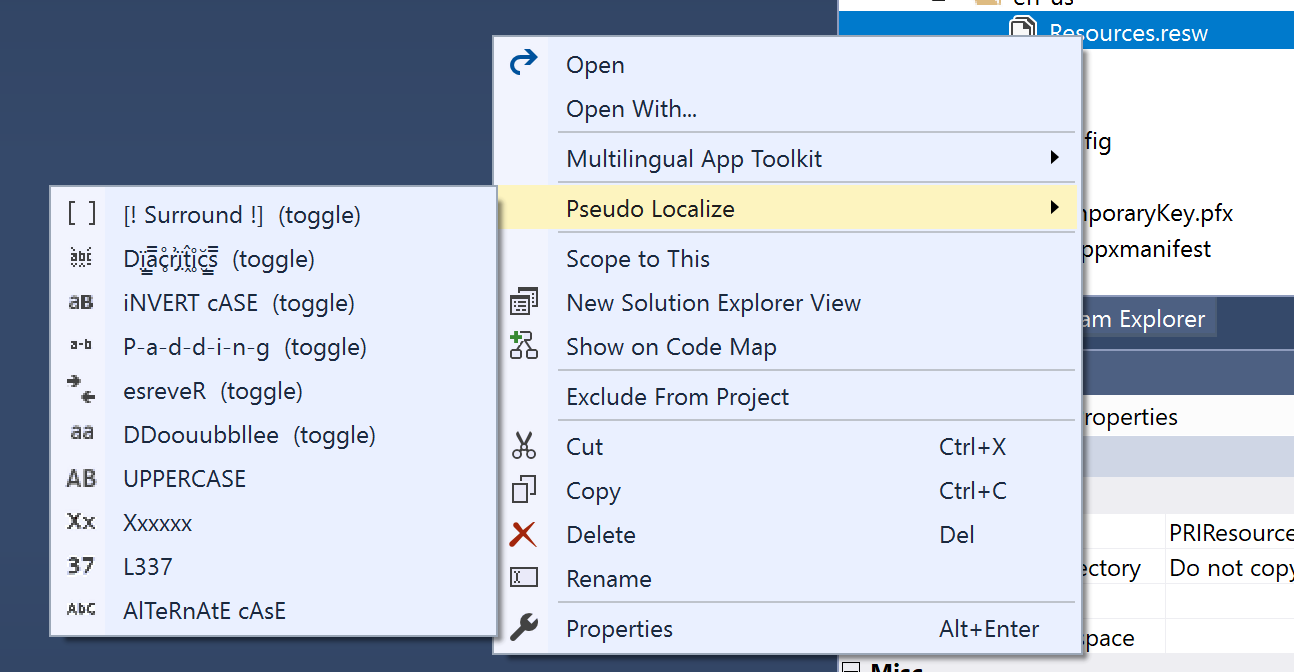
I have a tool to help test the localization of strings in an app. It does this by making changes to the resource files (.resx & .resw) to help make it easy to test that all content is coming from the resource file. There are a number of different options available and more on this is covered in my book.


I've just released a new version (3.0) that adds a single new feature.

The new feature is that it creates a backup of the original file before it changes the content.

I know that it can be frustrating when tools create unnecessary extra files but I feel this is better than someone getting into a situation where they lose lots of work.

There's an option to turn this off if it's not wanted but it's on by default as that's better for avoiding unexpected negative consequences.

This isn't the result of someone having a problem. Rather, it's me trying to avoid a problem before it occurs.
Someone did ask how to get back after they'd toggled one of the options (you just need to toggle it again to undo the change) but I realized that not everything is obvious to everyone and there are all sorts of developers with various skills, knowledge, and experience.
In case anyone ever converts all their resources to something that can be automatically reversed, and they don't have another copy, and they don't have source control. At least they'll now have a backup.

If you're interested in trying out this extension, you can get it from the VS Marketplace.

Monday, February 10, 2020

Modern XAML Development - slides and overview

Slides! - because that's all some people think a talk is.


Let me add some background.

Above are a modified version of the slides used in this talk. The modifications remove things that aren't relevant, were there just as a backup for the more risky demos, and strip out the animations.

This is not the whole talk!
There is no way you could take this deck and give the same talk.
For starters, there are 10 (yes ten) demos that aren't included here.

I do not have slide notes.
Sorry, no. For what the slide doesn't make clear you're out of luck.

It's a talk, and the slides are there to support what I say. I'm not there to talk about the text on the screen. I know some people do it that way but I don't.

The basic structure of the talk is as follows:
  • Why XAML was created?
  • How it's developed and evolved.
  • XAML has multiple versions, allows you to build for multiple platforms, and has multiple ways of doing things.
  • Given all those variations, tooling hasn't always been great, but that is starting to change.
  • There is a lot to be gained when thinking about XAML as code and what you expect from the tooling for other languages.
  • Given that comparison:
    - What about creating apps that use XAML?
    - What can be done in the editor?
    - What can be done in the designer?
    - What can be done at run-time?
  • What's coming in the future?
  • Conclusion and questions
I don't have a script for the whole talk. That's why I can't share one here.
Instead, I plan by focusing on the overall structure. I then look at how different elements can fit into that structure.

The structure comes down to two parts.

  1. Provide background
  2. Walkthrough building an app and show how the tooling can help at different stages.

Within the walkthrough, I combine a number of small demos to show different features and that things work with different platforms. This means jumping between WPF, UWP, and Xamarin.Forms projects but this shows that the tools apply regardless of the platform without repeating everything three times or just claiming what's possible.
Having multiple small demos also allows me to focus on one thing in each demo. Trying to put everything in a single demo was more complicated than I could manage and involved too many things being on screen at once which was potentially distracting and confusing.
Having multiple small demos made them easy to practice. I practiced the demos many many times in preparation for giving the talk. Having small, simple demos allows me to experiment within the rehearsal to become familiar with variations. It allowed me to explore things like "what if I did this differently?", "How could this go wrong?", or "How could I make this simpler?".
Because each demo doesn't depend (much) on what's gone before it I can make changes in one demo without having to worry about possible negative consequences in subsequent demos.
Finding times to practice small demos is easier for me to do than finding the time to practice a long, complicated demo.
Not being tied to a specific, strict format allows me the flexibility to adjust the talk when given based on anything that may happen on the day, has been said in other talks earlier in the conference, or where my mind goes at the time.

Preparing this way takes ages. It's not something that can be done without a lot of time to prepare and so it's not a technique that can always be used. I do it where/when I can.


I made sure to know the content inside out and roughly how long each section takes and then adjusted what I said accordingly on the day.

I deliberately include some questions on slides at the end. This is for a number of reasons.
  • It shows I'm open to answering difficult questions.
  • It provides an easy way to answer common questions that I didn't cover earlier.
  • It provides an opportunity to cover questions that don't naturally fit into the rest of the talk.

When I gave this talk in Stokholm I finished, including the Q&A section with 3 seconds remaining.
Additional questions were taken 1-to-1 immediately after the talk.

Hopefully, this is useful if you're interested.

Also, links to tools mentioned in the talk can be found at https://www.mrlacey.com/2020/02/modern-xaml-development-notes-from.html


Tuesday, February 04, 2020

Modern XAML Development - notes from SWETUGG

Today (at the time of posting) I'm talking in Stokholm about Modern XAML Development.


Here for your simple consumption are links to all the things I talked about, demonstrated or otherwise mentioned.


Sorry, it's not the actual slides. There are only so many cat pictures I want to contribute to the web. ;)

Update.
Slides and notes can be found at https://www.mrlacey.com/2020/02/modern-xaml-development-slides-and.html


Friday, January 24, 2020

Feb 25th is UnoPlatform day (in London & Birmingham)

Are you in London or Birmingham (in the UK)?
Want to learn more about the Uno platform?

Uno logo

You're in luck, as I'm giving introductory talks:

In London, on the morning of Feb 25, at 9AM

In Birmingham, on the evening of Feb 25, at 6PM


More details and registration can be found by following the above links.

If you're in (or near) London but can't attend at this time (maybe you have work or something like that) stay tuned for details of an evening event coming soon...